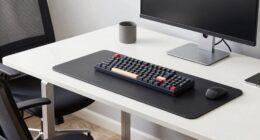
To work pain-free at your home office, focus on good ergonomics: keep your keyboard close, with elbows tucked in and forearms parallel to the ground. Position your monitor at eye level and use proper lighting to reduce eye strain. Sit back with your back supported, feet flat, and keep frequently used items within easy reach. Small adjustments can make a big difference, and continuing with these tips will help you create a more comfortable workspace.
Key Takeaways
- Position your keyboard at elbow height to keep wrists neutral and prevent strain.
- Use proper lighting to reduce eye fatigue and avoid glare on your screen.
- Maintain good posture by supporting your lower back and keeping feet flat on the floor.
- Monitor at eye level to prevent neck and shoulder tension.
- Keep frequently used items within easy reach to avoid overstretching and promote ergonomic comfort.

Working from home offers flexibility, but it also requires paying attention to your workspace setup to avoid discomfort and long-term health issues. One of the most important aspects is ensuring your keyboard placement is correct. Your keyboard should be positioned so that your elbows stay close to your sides and your forearms are parallel to the ground. This means not reaching forward or angling your wrists upward. A proper placement helps prevent strain on your wrists, forearms, and shoulders, reducing the risk of repetitive strain injuries like carpal tunnel syndrome. Keep your keyboard directly in front of you, and consider using a keyboard tray if your desk height doesn’t naturally support this position. Adjusting the height so your hands rest comfortably on the keys without shrugging your shoulders is essential for maintaining good posture throughout your workday.
Lighting optimization is another critical factor in creating an ergonomic workspace. Poor lighting can cause eye strain, headaches, and fatigue, which can all impact your productivity and comfort. To improve lighting, position your desk near a natural light source if possible, ensuring the light doesn’t create glare on your screen. Use adjustable blinds or curtains to diffuse sunlight and avoid direct hits on your monitor. Supplement natural light with task lighting—such as a desk lamp with adjustable brightness—so you can customize the illumination based on your needs. Keep the light directed away from your eyes and monitor to prevent reflections and glare, which strain your eyes over time. Proper lighting also helps you see your work clearly, reducing the need to lean forward or squint, which can contribute to neck and shoulder tension.
In addition to keyboard placement and lighting, be mindful of your overall posture. Sit back in your chair with your lower back supported, and keep your feet flat on the floor or on a footrest. Your monitor should be at eye level to avoid neck strain, and your mouse should be within easy reach so you don’t overstretch. Take regular breaks to stretch and move around, which helps prevent stiffness and promotes circulation. Remember, creating an ergonomic setup isn’t a one-time task; it’s an ongoing process of adjusting your workspace as you discover what works best for your body. By paying close attention to your keyboard placement and lighting optimization, you set the foundation for a healthier, more comfortable home office that allows you to work without pain.
Frequently Asked Questions
How Can I Prevent Eye Strain During Long Work Hours?
To prevent eye strain during long work hours, you should use blue light filters on your screens and take regular breaks to rest your eyes. Practice eye exercises like blinking frequently and focusing on distant objects every 20 minutes. Adjust your monitor’s brightness and contrast for comfort, and make sure your workspace is well-lit. These steps help reduce fatigue and keep your eyes healthy during extended computer use.
What Are the Best Ergonomic Accessories for Small Workspaces?
You should consider using compact ergonomic accessories like desk organizers to keep your workspace tidy and monitor stands to elevate your screen, reducing neck strain. These accessories maximize limited space, making your small work area more functional and comfortable. Opt for adjustable monitor stands to customize your viewing height, and choose sleek desk organizers to keep essentials within reach without clutter. This setup improves posture and productivity in tight spaces.
How Often Should I Take Breaks to Avoid Musculoskeletal Issues?
Think of your body as a car engine needing regular pit stops. You should take a break every 30 to 60 minutes to prevent strain. During these breaks, stretch and make posture adjustments to keep your muscles relaxed. This frequent break frequency helps avoid musculoskeletal issues and maintains comfort. Staying consistent with this routine guarantees you stay productive and pain-free while working at your home office.
Are There Specific Chair Adjustments for Different Body Types?
You should customize your chair with body-specific adjustments for ideal support. Adjust the seat height so your feet rest flat on the floor, and set the lumbar support to match your lower back’s curve. Customize armrests to keep your shoulders relaxed, and tilt the chair to reduce pressure on your spine. By tailoring chair customization to your body, you’ll work comfortably and reduce the risk of musculoskeletal issues.
What Lighting Options Reduce Glare and Improve Focus?
Like a lighthouse guiding ships, proper lighting keeps your workspace clear and focused. Use adjustable task lighting to direct light exactly where you need it, reducing glare and eye strain. Incorporate natural light options by positioning your desk near windows, and consider using sheer curtains to diffuse harsh sunlight. Combining these strategies helps you stay alert and comfortable, so you can work efficiently without discomfort or distraction.
Conclusion
Now that you know the secrets to perfect home office ergonomics, imagine how much easier your days will be. But there’s one essential adjustment you haven’t considered yet—something that could transform your entire work experience. Ready to discover it? Stay tuned, because making this simple change might just be the game-changer you need to work pain-free… and enjoy your home office like never before. Don’t miss out on the best part!