
TL;DR

Get the little things that make your day delivered free — and shop member deals
- Fast, free delivery on millions of items
- Access to Prime Big Deal Days deals on October 6–7
- Prime Video, Amazon Music and more included
Building an AI workstation used to be cheaper, but in 2026, prebuilt options often match or beat DIY costs while offering faster deployment and validated thermals. The choice now depends more on control and strategic needs than just price or time.
Imagine you’re ready to dive into AI projects, but the decision looms: should you build your own powerhouse or buy a ready-made system? The old rule—build for savings, buy for speed—no longer holds in 2026. Prices have shifted, and the stakes are higher than ever.
This isn’t just about dollars. It’s about control, risk, and how quickly you can get your AI workflows running. Whether you’re a solo developer, a startup, or an enterprise, understanding the real tradeoffs can save you months of headaches—and dollars. So, let’s cut through the hype and get real about build versus buy in today’s AI hardware landscape.
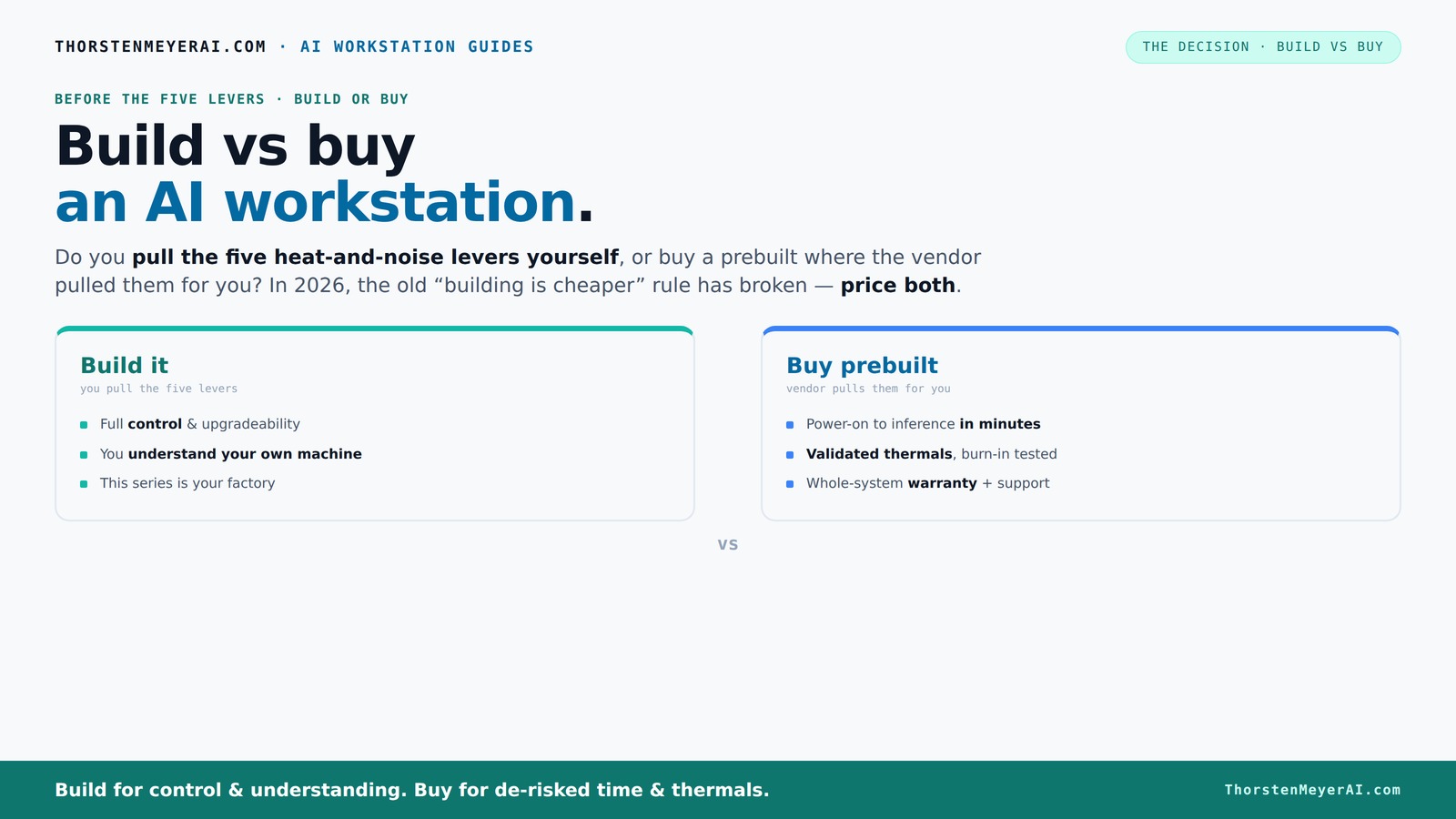
Build vs buy
an AI workstation.
The real question behind this whole series: do you pull the five heat-and-noise levers yourself, or buy a prebuilt where the vendor pulled them for you? And in 2026, the old “building is cheaper” rule has broken. Match your situation in Part 3.
Key Takeaways
- Market shortages in 2026 have leveled prices, making prebuilt systems often comparable or cheaper than DIY builds.
- Prebuilts handle thermals and noise tuning at the factory, saving time and reducing risk for your AI workflows.
- Building your own rig offers full control and customization—ideal for compliance, proprietary AI, or strategic differentiation.
- For rapid deployment and enterprise reliability, buying prebuilt often outperforms DIY in speed and support.
- A hybrid approach—buy the hardware, build the AI layer—strikes the best balance of speed, control, and flexibility.
Why 2026 Changes the Build vs Buy Game — Price and Speed Take a New Turn
In the past, building your own AI workstation was the clear winner for cost. Raw parts were cheaper, and custom builds gave you flexibility. But in 2026, the landscape has flipped. Component shortages and bulk buying mean prebuilt systems often cost the same or less than DIY parts.
For example, a high-end GPU like an NVIDIA RTX 4090 used to cost around $1,600. Now, due to shortages, you might pay close to that price separately, but prebuilt vendors can include it at a similar or even lower total cost thanks to bulk procurement. The time to assemble and test your own rig? Often stretching into 2-3 months, while prebuilt options are ready in weeks.
So, the old rule—build to save money—no longer holds. Instead, consider whether speed or control drives your decision.
Understanding this shift is crucial because it means that the traditional advantage of DIY—cost savings—may no longer justify the extra time and effort, especially when rapid deployment can be a competitive edge. Meanwhile, the market's current volatility forces a re-evaluation of what 'cheaper' truly means, factoring in labor, opportunity cost, and risk of delays.
Who Actually Pulls the Levers? Building vs Buying the Thermal and Noise Controls
Building your own AI workstation means you become the thermal engineer. You pick a quiet GPU, undervolt it, optimize airflow, and tune fan curves. It’s a puzzle—like tuning a sports car for maximum power without overheating.
For instance, you might choose a quiet GPU and pair it with a custom water-cooling loop. It’s satisfying—until it’s not. Mistakes in airflow or cooling can cause throttling or noisy operation. Learn more about thermal management.
Buying prebuilt shifts this burden. Vendors like Lambda or BIZON handle the thermal tuning for you. They run 24-48 hours of stress tests, validate cooling solutions, and often include water cooling that runs whisper-quiet. You pay a premium, but you skip the guesswork and enjoy a system that’s ready to go.
This difference matters because thermal management directly impacts performance, noise levels, and system longevity. DIY cooling can be optimized for silence and efficiency, but it requires expertise and time. Prebuilt systems, with factory-validated thermals, reduce the risk of overheating and noise complaints, which are critical for long-term operational stability and user comfort. The tradeoff is cost versus peace of mind and immediate readiness.
The Table That Sums It Up: Build vs Buy in a Nutshell
| Feature | Build Your Own | Buy Prebuilt |
|---|---|---|
| Cost | Potentially cheaper upfront, but market shortages can spike prices | Often comparable or cheaper due to bulk buying and economies of scale |
| Speed to Deployment | Weeks to months, depending on parts availability and assembly time | Weeks, often ready in 2-4 weeks |
| Control & Customization | Full control—pick every component, tune for noise/heat | Limited customization, but vendor handles thermals and noise |
| Risk & Support | Higher risk, requires technical skill, no warranty if DIY fails | Lower risk, warranty included, vendor support available |
| Thermal & Noise Tuning | You do it—can be optimized for silence and heat | Pre-validated, optimized at the factory |
Understanding these differences helps you evaluate which approach aligns with your operational priorities. For instance, if silence and thermal efficiency are critical for your environment, DIY offers customization but at the cost of time and expertise. Conversely, if your focus is on rapid deployment and reliability, prebuilt solutions provide tested, ready-to-run systems that minimize surprises and downtime.
When Building Makes Sense — Control, Customization, and Core AI Work
Building your own AI workstation makes sense when control and customization matter most. If your project requires strict compliance, custom data handling, or unique workflows, owning the architecture is worth the effort.
For example, a government agency might build a system to meet strict data residency and security standards. They want to control every layer—from hardware to software—so they choose to build from scratch, despite the longer timeline.
Another case: startups focusing on proprietary AI models might prefer building to differentiate their tech stack, ensuring no vendor dependency and full control over updates and integrations. This strategic approach allows them to tailor hardware and software for maximum efficiency and security, which is often unachievable with off-the-shelf solutions.
In essence, building provides the flexibility to implement proprietary architectures, adhere to regulatory standards, and maintain strategic control—tradeoffs that can be vital for mission-critical or highly innovative projects.
Why Buying is the Smart Play for Speed and Reliability
If your priority is quick deployment and proven stability, buying a prebuilt is the way to go. Vendors validate thermals, test for long-term reliability, and include warranties—saving you months of setup time.
Imagine a startup with a 3-month deadline for deploying an AI model. A prebuilt system can be shipped, set up, and running within a few weeks, letting the team focus on core development rather than hardware fiddling.
Additionally, prebuilt solutions often come with enterprise-grade support, which reduces downtime and troubleshooting efforts. This support is crucial in high-stakes environments where hardware failures can cause costly delays or data loss. The reliability of pre-validated systems allows teams to focus on innovation rather than maintenance, making them ideal for production environments where uptime is critical.
Deciding Between Build, Buy, or Hybrid — The Real Strategy
The smart move often isn’t choosing one or the other—it’s blending both. Many organizations buy the base hardware for speed and reliability, then build custom layers for AI-specific functions.
This hybrid approach allows leveraging pre-validated hardware while tailoring software and AI pipelines to meet specific needs. For example, a company might purchase a prebuilt GPU server for immediate deployment, then develop proprietary AI frameworks or data management layers on top, combining the speed of ready-made hardware with the flexibility of custom software.
This strategy is increasingly popular because it balances risk, cost, and control—especially in regulated or competitive markets where rapid innovation and compliance are both priorities. It enables organizations to accelerate time-to-market while maintaining strategic differentiation and control over core AI capabilities.
What Are the Hidden Costs? Building or Buying So You Know the Real Price
Many underestimate the total cost of ownership. Building a system might seem cheaper upfront, but consider ongoing support, maintenance, cooling, and upgrades. DIY systems often need expert tuning and troubleshooting, which adds labor costs and potential delays.
Buying prebuilt includes support and warranties, but you pay a premium for that peace of mind. However, this premium can translate into reduced downtime, fewer troubleshooting hours, and faster resolution of issues, which are critical for maintaining productivity in high-stakes AI projects.
Long-term costs also include upgrades and scalability. DIY setups might require periodic hardware replacements or additional cooling investments, which can add up over time. Conversely, prebuilt vendors often provide scalable solutions and upgrade paths, reducing the total cost of ownership and ensuring your system remains competitive without frequent major overhauls.
Understanding these hidden costs helps you make a strategic choice that balances upfront investment with ongoing operational expenses, ensuring your AI infrastructure aligns with your long-term goals.
Frequently Asked Questions
Should I build or buy a prebuilt AI workstation for my use case?
It depends on your priorities. If you need quick deployment, proven reliability, and support, a prebuilt is likely best. If you want full control, customization, or have specific security requirements, building may be the better route.Which option is cheaper over 3 years: build or buy?
Market conditions in 2026 often make prebuilt systems comparable or even cheaper when factoring in support, maintenance, and time costs. Always price both options for your specific configuration.How much faster is a prebuilt AI workstation to deploy?
Prebuilts can be ready in 2-4 weeks, whereas building from scratch might take 2-3 months, especially given current component shortages and assembly time.What are the hidden costs of building vs buying?
Building can incur higher ongoing support and troubleshooting costs, while buying includes warranties and support but often involves a premium upfront. Consider long-term support and maintenance in your total cost.Will buying lock me into one vendor?
Vendor lock-in is a real concern with prebuilt systems. You rely on their roadmap and upgrade options, so evaluate vendor flexibility and support before deciding.Conclusion
In 2026, the choice isn’t just about saving money or tinkering. It’s about what matters most—speed, control, or risk mitigation. The smart move? Consider a hybrid approach: buy the reliable hardware, then customize your AI stack to stand out.
Picture your team, up and running in weeks, with a system tuned for silence and cool operation. That’s the power of making a strategic build vs buy decision today. Are you ready to choose your path?
Products Worth Considering
As an affiliate, we earn on qualifying purchases.