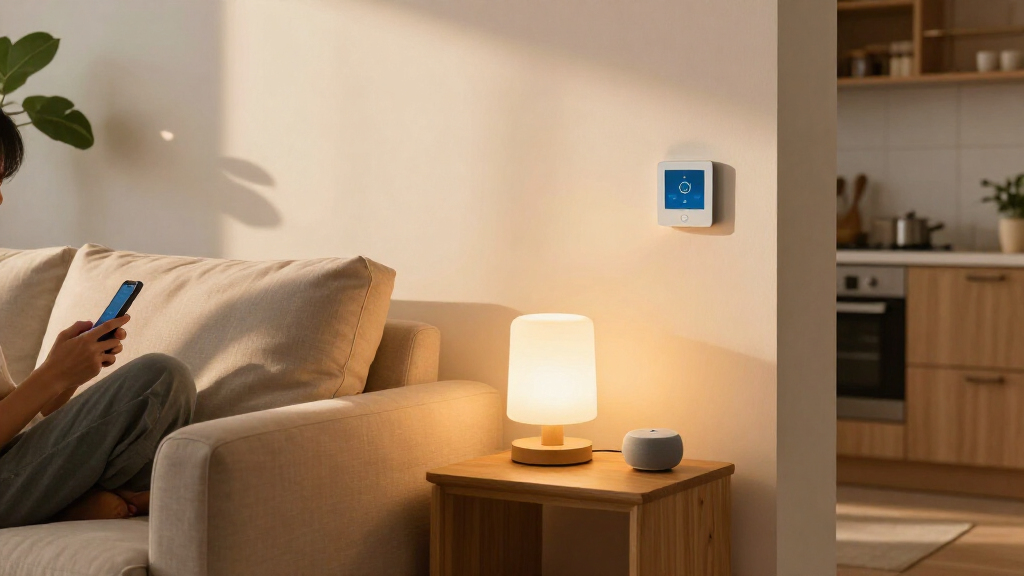

Amazon Alexa and Home Assistant can both connect smart lights, sensors, plugs, thermostats, and other devices, but they suit different approaches to home automation. Alexa is built around voice control and a managed cloud service: many households can add compatible devices with little configuration. Home Assistant is a self-managed platform that brings devices and automations into a customizable system, often running locally on hardware in the home. That makes the central choice convenience versus control. Choose Alexa if you want a straightforward setup and familiar voice commands; choose Home Assistant if you want more detailed automations, broader integration options, and greater control over where your home’s data is handled.

Get the little things that make your day delivered free with Prime
- Fast, free delivery on millions of items
- Prime Video, Amazon Music and more included
- Member-only deals all year

Lutron Caseta Smart Dimmer Starter Kit with Smart Hub, Dimmer Switch, and Pico Remote
- ✔ Included items: Smart hub, dimmer switch, Pico remote, wall plate bracket
- ✔ Connectivity: Proprietary Clear Connect; Wi-Fi free
- ✔ Compatibility: Alexa, Apple HomeKit, Google Home, Ring, Sonos, SmartThings

Hubitat Elevation C-8 Pro Smart Home Hub
- ✔ Model: Elevation C-8 Pro
- ✔ Protocols: Matter 1.5, Z-Wave 800 Series with Long Range, Zigbee 3.0, Bluetooth
- ✔ Voice assistant compatibility: Amazon Alexa, Google Home, Apple HomeKit
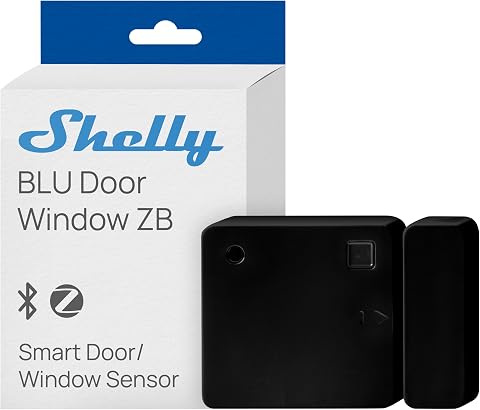
Shelly BLU Door/Window Sensor, Black, Zigbee and Bluetooth
- ✔ Connectivity: Zigbee and Bluetooth
- ✔ Power: Battery powered; lithium-ion
- ✔ Stated battery life: Up to 5 years
At a Glance
| Criteria | Amazon Alexa | Home Assistant | Winner |
|---|---|---|---|
| Setup and everyday use | Simple app-led setup for many supported devices; little maintenance | More initial configuration; users choose and maintain the host system | A |
| Device compatibility | Broad mainstream ecosystem, with compatibility depending on device and supported standards | Large catalog of integrations across brands and protocols, but setup varies by device | B |
| Automation depth | Accessible routines for common schedules, triggers, and voice actions | Highly customizable automations with conditions, sensors, and multiple actions | B |
| Local control and privacy | Cloud services play a central role; settings and data handling depend on Amazon’s services | Can run many automations locally and gives users more control over data and configuration | B |
| Reliability and internet dependence | Many cloud-dependent features need internet access; some device functions may continue locally | Local automations can keep working through an internet outage, though remote access and cloud integrations may not | B |
| Voice control | Strong native Alexa voice control through compatible Echo devices | Voice control is possible through supported assistants and Home Assistant options, but takes more setup | A |
| Cost and upkeep | Low entry cost if you already own Echo hardware; some features and services can depend on subscriptions | May require dedicated hardware and ongoing time; core software is free | Depends |
Lutron Caseta Smart Dimmer Starter Kit with Smart Hub, Dimmer Switch, and Pico Remote
The Lutron Caseta Smart Dimmer Starter Kit is our best overall choice for a buyer whose first automation goal is making existing lights smarter. It controls compatible dimmable lighting at the wall, so we do not need to replace every bulb or rely on each bulb remaining powered at its socket. The dimmer supports up to 150W of dimmable LED load, and its no-neutral-wire requirement can make installation possible in older homes where some smart switches are a poor fit. It also supports single-pole and 3-way circuits, giving buyers a way to extend control without adding conventional wiring for the second location.Its included Pico remote is a practical distinction from the Hubitat hub and Shelly sensor: those products can coordinate automations, but neither provides this ready-to-use physical lighting control point. Lutron’s proprietary Clear Connect connection is Wi-Fi free, which keeps the dimmer’s communication separate from ordinary wireless network traffic. The included hub then connects the lighting system to supported ecosystems such as Alexa, Apple HomeKit, Google Home, Ring, Sonos, and SmartThings. That makes Caseta a focused lighting system that can still participate in broader routines.The tradeoff is that the kit is not a standalone switch. We need the Lutron hub for operation and integration, adding a setup step and another device to the system. A wall plate is not included, and the LED load ceiling may rule it out for some fixtures. Compared with Hubitat, Caseta offers a simpler, more defined lighting use case but less flexibility as a general automation brain. Compared with Shelly, it takes over the wall control rather than simply sensing whether an opening has moved. Choose it when dependable, physical smart dimming is the priority; skip it if we want one hub to build complex routines across many brands.
Pros:
- No neutral wire required, which broadens installation options in older homes.
- Includes both a wall dimmer and Pico remote for flexible physical control.
- Clear Connect operates separately from Wi-Fi traffic.
- Works with major voice assistant and smart home platforms through its hub.
Cons:
- Requires the proprietary Lutron hub for operation and integrations.
- Wall plate is not included, and dimmable LED load is limited to 150W.
Best for: Homeowners who want to automate existing dimmable lights, need a switch compatible with wiring that lacks a neutral, or want a wireless second control point.
Not ideal for: Buyers seeking a general-purpose automation hub, those who do not want a proprietary hub, or installations exceeding the dimmer’s supported LED load.
Bottom line: We recommend Caseta as the most approachable, complete automation upgrade here when smart lighting is the immediate goal.
“We recommend Caseta as the most approachable, complete automation upgrade here when smart lighting is the immediate goal.”
Hubitat Elevation C-8 Pro Smart Home Hub
If our goal is to connect devices from different ecosystems and build routines around them, the Hubitat Elevation C-8 Pro is the most ambitious pick in this roundup. It supports Matter, Z-Wave 800 Series with Long Range, Zigbee 3.0, and Bluetooth, while offering integrations with Alexa, Google Home, Apple HomeKit, and Ring. That range gives it a broader role than the Lutron kit, which is centered on lighting, or the Shelly sensor, which is an input for a narrower set of automations. Hubitat is the option to consider when the home already has a mix of compatible devices or is expected to grow.Its strongest automation advantage is local processing. Supported routines can continue to run when internet access is unavailable, which can matter for routines triggered by local sensors and devices. The platform does not require a subscription for its core features. Two external antennas are intended to extend wireless reach, and the hub is specified for compatibility with more than 1,000 devices across over 100 brands. An AI-assisted routine builder may help with setup, while Rule Machine offers a path to more detailed logic as needs become more specific.That flexibility comes with a real learning curve. Hubitat is not as immediately legible as installing the Caseta dimmer for a single lighting task, and it depends on having compatible devices to control. Buyers should verify that the specific devices and desired integrations are supported before planning a routine; protocol support by itself does not guarantee every feature works across every brand. Compared with Caseta, Hubitat brings broader coordination and local routine processing but asks us to do more configuration. Compared with Shelly, it can serve as the broader automation center, though the sensor may still need a compatible gateway or device to participate. Pick Hubitat when control and flexibility matter more than a quick, single-purpose installation.
Pros:
- Local processing supports routines without an internet connection.
- Combines Matter, Z-Wave, Zigbee, and Bluetooth support.
- Integrates with major voice assistant ecosystems and Ring.
- Platform features do not require a recurring subscription.
Cons:
- Advanced routines can take time to configure and understand.
- Automation value depends on owning compatible devices and checking integration support.
Best for: Technically confident buyers building routines across multiple compatible protocols who want supported automations to run locally.
Not ideal for: People who want an uncomplicated single-device upgrade, have no compatible devices to connect, or expect every feature to configure itself.
Bottom line: We choose Hubitat when a flexible local automation center matters more than the simplicity of a focused lighting kit.
“We choose Hubitat when a flexible local automation center matters more than the simplicity of a focused lighting kit.”
Shelly BLU Door/Window Sensor, Black, Zigbee and Bluetooth
The Shelly BLU Door/Window Sensor is the most specialized device here, aimed at buyers who want an opening’s movement to trigger an automation. It can monitor doors, windows, gates, and garage doors, and it measures tilt angle and luminosity as well as reporting a change in position. Those extra readings can help shape routines beyond a simple open-or-closed alert, provided the connected system can use them. Its small, light body makes it a discreet addition to an entry point where a larger control device would be unnecessary.For an automation such as turning on lights when a door opens or sending a notification when a garage position changes, Shelly provides the sensor input while a compatible hub or device provides the response. Its Zigbee and Bluetooth connectivity offer two ways to connect, and the stated battery life is up to five years. The listed maximum range is 400 meters, though actual performance will depend on the surrounding layout and compatible gateway. Compared with Caseta, this is not a lighting controller; it can trigger a lighting routine, but only if the rest of the system supports that link. Compared with Hubitat, it supplies a specific sensor role rather than acting as the central place for varied automations.The key limitation is the gateway requirement. Compatible Shelly Plus, Pro, Gen3, and Gen4 devices can serve as one, but buyers need to confirm their existing equipment or plan for a suitable gateway before purchasing. The battery type is described as nonstandard, which may make replacement less convenient than using a common household cell. This is a good add-on when we know what device will receive its signals and what routine we want to build. It is a poor first purchase for someone expecting a complete automation system in one box.
Pros:
- Supports both Zigbee and Bluetooth connectivity.
- Measures tilt angle and luminosity as well as opening status.
- Compact, lightweight form suits several types of openings.
- Specified battery life is up to five years.
Cons:
- Requires a compatible gateway or Shelly device to operate.
- Uses a nonstandard battery type that may be less convenient to replace.
Best for: Buyers with a compatible Shelly gateway who want compact door, window, gate, or garage monitoring with tilt and light measurements.
Not ideal for: Anyone without a compatible gateway or looking for a standalone hub, switch, or complete automation starter system.
Bottom line: We recommend Shelly as a focused sensor add-on once the gateway and the automation it will trigger are already accounted for.
“We recommend Shelly as a focused sensor add-on once the gateway and the automation it will trigger are already accounted for.”
As an Amazon Associate we earn from qualifying purchases.
Key Differences
The biggest difference is how much responsibility the homeowner takes on. Alexa handles much of the device discovery, voice interface, and service management for you. That is a practical advantage when the goal is to turn on lights by voice, set a few schedules, or control common devices from one app. Home Assistant asks for more choices at the outset, including where it runs and how devices connect. In return, it can combine devices and signals into more specific routines than a basic voice assistant typically offers.
Control and convenience also pull in different directions. Home Assistant can keep many automations inside the home, which can improve privacy and allow them to run without an internet connection. The benefit depends on the devices and integrations used; cloud-connected products still rely on their providers. Alexa provides a more polished, ready-to-use voice experience for households that already use Echo speakers, but its cloud-centered model gives users less control over processing and service changes.
For many households, Alexa is the sensible starting point, especially when the desired setup is modest and compatible devices are already in place. Home Assistant is the stronger choice for people who want to coordinate a varied collection of devices, build detailed rules, or keep more control in their own hands. Its software has no license fee, but hardware, setup time, and maintenance count toward its real cost.
Detailed Comparison
Setup and everyday use (Amazon Alexa wins — moderate)
Alexa wins by a moderate margin for ease. Adding a supported device and creating a basic routine is usually more direct, and voice commands are ready to use with compatible Echo hardware. Home Assistant requires choosing and configuring a host, integrations, and sometimes device protocols. For a small home setup, Alexa saves time; for someone comfortable troubleshooting, the extra work can create a system tailored to the home.
Device compatibility (Home Assistant wins — moderate)
Home Assistant wins by a moderate margin for breadth. Its integration catalog can bring together devices from many brands and services, including products that do not fit neatly into a single consumer ecosystem. Alexa supports a wide range of popular smart home products, but compatibility and available features depend on each device and its connection method. Buyers should check support for their specific models before choosing either platform.
Automation depth (Home Assistant wins — major)
Home Assistant wins by a major margin for complex rules. It can use multiple sensors, conditions, time windows, and device states to decide what should happen, which helps when automations need to respond to how a home is actually being used. Alexa routines cover common schedules and triggers with less effort, but offer less room for intricate logic. If the household mainly wants timed lights or simple voice-triggered actions, Alexa’s limits may not matter.
Local control and privacy (Home Assistant wins — moderate)
Home Assistant wins by a moderate margin because many of its automations can run locally and its configuration gives the homeowner more say over data flows. The privacy benefit is not automatic: cloud integrations and connected devices can still send data to their providers. Alexa’s voice and smart home experience relies more heavily on Amazon’s cloud services, so it offers less local control. Privacy-focused buyers should review the behavior of individual devices as well as the platform.
Reliability and internet dependence (Home Assistant wins — moderate)
Home Assistant wins by a moderate margin for routines that use local devices and integrations. Those automations may continue to run when the internet is down, while remote access and cloud-connected functions can still fail. Alexa’s cloud-dependent features are more exposed to internet or service outages. The practical difference matters most for automations people expect to work consistently, such as sensor-based lighting; it matters less for occasional voice commands.
Voice control (Amazon Alexa wins — major)
Alexa wins by a major margin for a ready-made voice interface. Echo speakers are designed around Alexa, and compatible smart home devices can often be controlled with familiar commands after setup. Home Assistant can work with voice assistants and its own supported voice options, but users may need to configure hardware, integrations, and commands. Choose Alexa if hands-free control is central; choose Home Assistant when voice is one feature within a larger custom system.
Cost and upkeep (moderate difference)
There is no universal winner. Alexa can be cheaper to start if the household already owns an Echo and compatible devices, though some services or advanced product features may carry subscription costs. Home Assistant’s core software is free, but it may require a dedicated computer or hub and time for maintenance. Alexa generally costs less in effort; Home Assistant can offer stronger value for someone who wants extensive automation and is willing to manage it.
Amazon Alexa: Pros and Cons
Pros:
- Quick setup for many mainstream devices
- Straightforward voice control with compatible Echo speakers
- Low extra cost for households that already own Alexa hardware
- Good fit for common schedules and simple routines
Cons:
- Many features depend on internet access and Amazon services
- Less suited to intricate automations across many brands
- Less control over where processing and data handling take place
- Compatibility and functions vary by device
Home Assistant: Pros and Cons
Pros:
- Detailed automations using multiple devices, states, and conditions
- Broad integration options across brands and device types
- Many automations can run locally
- More control over configuration and data flows
Cons:
- More setup and technical decisions at the start
- Requires a host device and occasional maintenance
- Voice control can take extra configuration
- Cloud-dependent devices and integrations may still rely on internet services
Who Should Choose What
Choose Amazon Alexa if:
- You want basic lighting, plugs, or thermostat control with minimal setup.
- You already use Echo speakers and value hands-free voice commands.
- Your routines are mostly schedules, simple triggers, and common device actions.
Choose Home Assistant if:
- You want one system to coordinate devices from several brands and protocols.
- You need rules that depend on multiple sensors, conditions, or device states.
- Local operation, customization, and greater control over data flows matter to you.
Skip both if: Skip both if your devices cannot connect to either platform or you only need a single product’s own app and controls.
Value for Money
Alexa is usually the better value for a household that already owns an Echo and needs only a few straightforward routines: it keeps setup effort and added hardware costs low. Paying for Home Assistant can be worthwhile when detailed automation, broader integration, or local control would solve a real need. Its software is free, but hardware and the owner’s time are part of the cost. If those capabilities would go unused, the added setup is hard to justify; if they replace several disconnected systems, the effort may pay off in a more coherent home setup.
Final Verdict
For most people starting with a few smart devices, choose Amazon Alexa. It offers the simpler path to everyday control and is especially appealing if voice commands and Echo speakers matter. Choose Home Assistant if you want to build a more capable system across brands, rely on local automations, or tailor rules beyond basic routines. The deciding factor is how much control you need: Alexa makes common tasks easy, while Home Assistant rewards people willing to configure and maintain a system that fits their home.
Frequently Asked Questions
Can Alexa and Home Assistant be used together?
Yes. Some households use Alexa for voice commands and Home Assistant for more detailed automations. The connection depends on supported integrations and setup, and features can vary, so check compatibility for the devices and services involved.
Which platform is better for beginners?
Alexa is generally easier for beginners who want supported devices, simple routines, and voice control. Home Assistant is approachable for people willing to learn its setup, but it involves more decisions and troubleshooting.
Does Home Assistant work without internet?
Many automations can run locally without an internet connection when the host and connected devices are available on the home network. Remote access, voice assistants, and cloud-based integrations may stop working until the connection returns.
Is Home Assistant cheaper than Alexa?
Home Assistant’s core software is free, but it may require dedicated hardware and maintenance time. Alexa can cost less to start if you already own an Echo, while some devices or services may add recurring costs. The better value depends on the features you will use.