
For most households, the Google Nest Doorbell (Wired, 3rd Gen) is my best overall smart doorbell pick, pairing 2K HDR video with color night vision and a wired setup. The eufy Security Video Doorbell E340 stands out for its dual-camera view, while the Tapo D225 offers flexibility with wired or battery power. The central choice is between a dependable power connection and easier installation, plus whether you prefer broader coverage, local recording, or a particular smart-home platform. Subscription policies and wiring requirements can matter as much as resolution. Read on for the full breakdown and help matching a doorbell to your home.

Get the little things that make your day delivered free with Prime
- Fast, free delivery on millions of items
- Prime Video, Amazon Music and more included
- Member-only deals all year
Key Takeaways
- Wired models lead this lineup for a fixed setup: the Google Nest Doorbell (Wired, 3rd Gen) combines 2K HDR video and color night vision, but buyers need compatible wiring.
- Dual cameras solve a different problem than higher resolution: the eufy E340 and Anona 3K model add coverage aimed at reducing blind spots near the doorstep.
- Flexible power has practical value: the Tapo D225 can run wired or on battery, offering an alternative when a home’s existing wiring is inconvenient or unsuitable.
- Subscription preferences narrow the field: Anona and BOIFUN advertise no-subscription use, while buyers should check which recording and alert features remain available without a plan on any model.
- Several entries are close variants, not separate feature classes: three listings share the Nest wired 3rd Gen name, so color and listing details should not be mistaken for a distinct camera design.
| Orbitell 1080p Wireless Video Doorbell Camera |  | Best for Focused Person Alerts | Video resolution: 1080p | Connectivity: 2.4GHz Wi-Fi | Motion detection: AI detection; alerts for motion and doorbell presses | VIEW ON AMAZON | See Our Full Breakdown |
| Ring Battery Doorbell 2K (2nd Gen), Speckled Gray |  | Best for Wide-View Battery Video | Video resolution: Retinal 2K | Enhanced zoom: Up to 6x | Field of view: 140° horizontal, 140° vertical | VIEW ON AMAZON | See Our Full Breakdown |
| Aqara Doorbell Camera G400 with Chime, 2K HD |  | Best for Flexible Smart-Home Integration | Resolution: 2K HD; 1200p with HomeKit | Field of view: 165° | Power: Wired or PoE; 8–24V AC/DC | VIEW ON AMAZON | See Our Full Breakdown |
| Google Nest Doorbell (Wired, 3rd Gen) – 2K HDR Video |  | Best for Google Home Households | Video resolution: 2K HDR | Night vision: Color night vision | Field of view: 166° | VIEW ON AMAZON | See Our Full Breakdown |
| Google Nest Doorbell (Wired, 3rd Gen), 2K HDR, Hazel |  | Best for a Hazel-Finish Google Home Setup | Model: Nest Doorbell (Wired, 3rd Gen), GA09968-US | Color: Hazel | Video resolution: 2K HDR (2000) | VIEW ON AMAZON | See Our Full Breakdown |
| TP-Link Tapo D210 2K Wireless Smart Video Doorbell with Chime |  | Best Value for Local Storage | Resolution: 2K | Field of view: 160° diagonal | Connectivity: 2.4GHz Wi-Fi | VIEW ON AMAZON | See Our Full Breakdown |
| eufy Security Video Doorbell E340 with Dual Cameras |  | Best for Package Monitoring | Video resolution: 2K | Camera setup: Dual cameras | Viewing angle: 160 degrees | VIEW ON AMAZON | See Our Full Breakdown |
| Anona 3K Dual Camera Video Doorbell with No Subscription and Chime |  | Best for High-Resolution Dual-Camera Coverage | Resolution: 3K, 5MP | Camera setup: Dual 5MP main and secondary cameras | Power: 5200mAh rechargeable battery or wired | VIEW ON AMAZON | See Our Full Breakdown |
| Blink Video Doorbell + Outdoor 4 Wireless Security Cameras System |  | Best Multi-Camera Security Bundle | Doorbell resolution: 1440 × 1440p | Outdoor 4 resolution: 1080p HD | Doorbell field of view: 150° | VIEW ON AMAZON | See Our Full Breakdown |
| Tapo D225 2K+ Smart Video Doorbell with Chime, Wired or Battery Powered |  | Best Overall for Flexible Coverage | Resolution: 2K QHD | Field of view: 180° head-to-toe | Power: 8–24V hardwired or built-in 10,000mAh battery | VIEW ON AMAZON | See Our Full Breakdown |
| Google Nest Doorbell (Wired, 3rd Gen) – 2K Video, Live View |  | Best for Continuous Wired Coverage | Video resolution: 2K HDR | Field of view: 166° | Power: Wired | VIEW ON AMAZON | See Our Full Breakdown |
| BOIFUN Wireless Video Doorbell Camera, 2K HD, No Subscription Required | 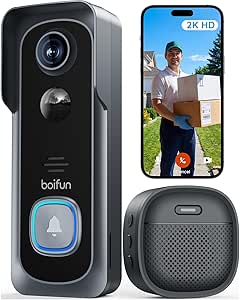 | Best for Subscription-Free Local Storage | Resolution: 2K HD | Field of view: 166° | Wi-Fi: 2.4 GHz | VIEW ON AMAZON | See Our Full Breakdown |
| smart doorbell | Field of view | Power | Night vision | Video resolution |
|---|---|---|---|---|
| Orbitell 1080p Wireless Video | — | — | Infrared LED | 1080p |
| Ring Battery Doorbell 2K | 140° horizontal, 140° vertical | Built-in lithium-ion battery | — | Retinal 2K |
| Aqara Doorbell Camera G400 wit | 165° | Wired or PoE; 8–24V AC/DC | 940nm infrared LEDs | — |
| Google Nest Doorbell | 166° | Wired | Color night vision | 2K HDR |
| Google Nest Doorbell | 166° | — | — | 2K HDR (2000) |
| TP-Link Tapo D210 2K Wireless | 160° diagonal | — | Full-color night vision with spotlight | — |
| eufy Security Video Doorbell E | — | Battery or 16–24V wired | Color night vision up to 16 feet | 2K |
| Anona 3K Dual Camera Video Doo | — | 5200mAh rechargeable battery or wired | — | — |
| Blink Video Doorbell + Outdoor | — | Doorbell: 3 AA lithium batteries; Outdoor 4: 2 AA lithium batteries each | — | — |
| Tapo D225 2K+ Smart Video Door | 180° head-to-toe | 8–24V hardwired or built-in 10,000mAh battery | Full color with motion-activated spotlight | — |
| Google Nest Doorbell | 166° | Wired | Yes | 2K HDR |
| BOIFUN Wireless Video Doorbell | 166° | — | — | — |
More Details on Our Top Picks
Orbitell 1080p Wireless Video Doorbell Camera
The Orbitell M52 is a sensible pick if you want wireless installation and alerts aimed at people rather than every passing car or animal. Its AI motion detection can cut down on distracting notifications, while two-way audio lets you answer from your phone and infrared night vision covers after-dark activity. Compared with the higher-resolution Ring Battery Doorbell 2K, Orbitell gives up detail and zoom, but its person-focused filtering is a useful distinction for a busy street or walkway. The main tradeoff is its 2.4GHz-only Wi-Fi, which rules it out for networks that use only 5GHz. Pre-capture recording also depends on a cloud subscription, so buyers who want that footage without ongoing service should look elsewhere.
Pros:- AI detection identifies people and filters vehicles and animals
- Two-way audio and smartphone alerts support remote conversations
- IP65-rated construction suits outdoor installation
- Infrared night vision provides visibility in low light
Cons:- Works with 2.4GHz Wi-Fi only
- Pre-capture recording requires a cloud subscription
- 1080p video offers less detail than the 2K and 2K HDR options here
Best for: Renters or homeowners who want a wireless doorbell with person-focused alerts and have a 2.4GHz Wi-Fi network.
Not ideal for: Buyers who need 5GHz Wi-Fi support, sharper-than-1080p footage, or subscriber-free pre-capture recording.
- Video resolution:1080p
- Connectivity:2.4GHz Wi-Fi
- Motion detection:AI detection; alerts for motion and doorbell presses
- Audio:Two-way audio
- Night vision:Infrared LED
- Cloud storage:AES-128 encrypted; pre-capture recording for subscribers
- Weather resistance:IP65
- Installation:Wireless
Our verdict“Choose the Orbitell if person-focused alerts and straightforward wireless installation matter more than higher-resolution video.”
Ring Battery Doorbell 2K (2nd Gen), Speckled Gray
For buyers who want a battery-powered doorbell but do not want to settle for basic detail, Ring’s Retinal 2K video and up to 6x enhanced zoom make this the strongest resolution-focused wireless pick in this group. Its 140° horizontal and vertical view is designed to show more of the approach, while Live View, motion alerts, and two-way talk cover everyday visitor checks. Compared with the Orbitell M52, Ring captures more detail and offers zoom, but the Orbitell’s person filtering is a clearer answer for reducing alerts from animals and vehicles. Ring’s built-in battery avoids a wired install, though charging still means taking time to recharge it, and the USB-C cable is not included. Some features also depend on a Ring Protect subscription, and video quality can vary with internet bandwidth.
Pros:- Retinal 2K video with up to 6x enhanced zoom
- 140° horizontal and vertical field of view
- Live View, motion alerts, and two-way talk
- Built-in rechargeable battery avoids doorbell wiring
Cons:- USB-C charging cable is not included
- Some features require a Ring Protect subscription
- Video quality may vary with internet bandwidth
Best for: Households that want a battery-powered doorbell with detailed video, a broad view, and compatibility with select Alexa devices.
Not ideal for: Buyers who prefer wired power, want all listed features without a subscription, or have unreliable Wi-Fi upload speeds.
- Video resolution:Retinal 2K
- Enhanced zoom:Up to 6x
- Field of view:140° horizontal, 140° vertical
- Power:Built-in lithium-ion battery
- Charging:USB-C; cable not included
- Connectivity:Wi-Fi 4, 2.4GHz single band
- Audio:Two-way talk
- Operating conditions:-4°F to 120°F; weather resistant
Our verdict“Pick the Ring if you want a cordless doorbell with more video detail and zoom than the Orbitell, and can accommodate periodic charging.”
Aqara Doorbell Camera G400 with Chime, 2K HD
The Aqara G400 suits buyers building a connected home around more than one platform: it supports HomeKit Secure Video, Alexa, Google Assistant, and SmartThings, rather than tying the doorbell to a single ecosystem. Its 165° view and local AI detection pair broad coverage with fewer unwanted alerts, while wired or PoE power and microSD or NAS storage give owners more setup choices than the battery-powered Ring. The flexibility comes with setup decisions: you need a compatible wired power source, and local storage requires a separately purchased microSD card. HomeKit Secure Video also needs an iCloud+ plan and compatible Apple hub, and resolution is limited to 1200p in that mode. Compared with the Google Nest Wired 3rd Gen, the G400 works across more ecosystems and offers local storage, but has more compatibility details to sort through.
Pros:- Works with HomeKit Secure Video, Alexa, Google Assistant, and SmartThings
- 165° field of view and local AI detection
- Wired or PoE power provides installation flexibility
- Supports microSD storage up to 512GB and local NAS backup
Cons:- MicroSD card is not included
- HomeKit Secure Video requires iCloud+ and a compatible Apple hub
- HomeKit use limits resolution to 1200p
Best for: Smart-home owners who use multiple ecosystems and want wired or PoE power plus local recording options.
Not ideal for: People seeking a battery-powered, minimal-setup doorbell or HomeKit users who expect full 2K resolution without an iCloud+ plan and Apple hub.
- Resolution:2K HD; 1200p with HomeKit
- Field of view:165°
- Power:Wired or PoE; 8–24V AC/DC
- Wi-Fi:Wi-Fi 6, 2.4GHz and 5GHz
- Security:WPA3
- Recording storage:MicroSD up to 512GB; local NAS backup
- Compatibility:HomeKit Secure Video, Alexa, Google Assistant, SmartThings
- Night vision:940nm infrared LEDs
Our verdict“Choose the G400 if cross-platform compatibility and local recording matter more than the simpler setup of the Google Nest.”
Google Nest Doorbell (Wired, 3rd Gen) – 2K HDR Video
This Nest is the most direct fit for buyers who already manage their home through Google Home. Its 2K HDR video, 166° field of view, and color night vision are aimed at showing visitors clearly across a broad entrance, while wired power avoids the charging routine required by the Ring Battery Doorbell 2K. That convenience depends on having compatible doorbell wiring; unlike Ring or the wireless Orbitell, this is not a flexible choice for a no-wiring installation. Google integration makes the Nest a more natural match for existing Google Home users than the Aqara G400, which supports more platforms and local storage. The tradeoff is that this model’s stated compatibility centers on Google Home, and advanced features require a Google Home Premium subscription.
Pros:- 2K HDR video
- 166° field of view
- Color night vision
- Google Home integration and encrypted data security
Cons:- Requires a wired connection
- Advanced features require Google Home Premium
- Its stated smart-home compatibility is limited to Google Home
Best for: Homeowners with existing doorbell wiring who use Google Home and want a wired camera with HDR video and color night vision.
Not ideal for: Renters or households without doorbell wiring, and buyers who need multi-platform support or want advanced features without a subscription.
- Video resolution:2K HDR
- Night vision:Color night vision
- Field of view:166°
- Power:Wired
- Compatibility:Google Home
- Data security:Encrypted data security
- Advanced features:Require Google Home Premium
Our verdict“The Nest is a strong match for wired Google Home households that value color night vision over the Ring’s battery-powered flexibility.”
Google Nest Doorbell (Wired, 3rd Gen), 2K HDR, Hazel
This Hazel version is for buyers who want the same wired Nest approach in a finish that suits their entryway. The core appeal is 2K HDR video with a 166° field of view, color night vision, intelligent alerts, and two-way audio; wired power also removes battery recharging from the routine. Compared with the Ring Battery Doorbell 2K, the Nest trades installation flexibility for continuous wired power and a Google Home-focused setup. It also sits close to the other Google Nest Wired 3rd Gen in this roundup, so the useful distinction here is the listed Hazel color and product details, not a separate feature set. Buyers still need compatible wiring, and some Gemini features require Google Home Premium. Choose it for the finish and ecosystem fit, not as a more capable alternative to the other Nest.
Pros:- 2K HDR video with a 166° field of view
- Color night vision and intelligent alerts
- Wired power avoids routine battery recharging
- Two-way audio supports conversations with visitors
Cons:- Requires a wired installation
- Some Gemini features require Google Home Premium
- Offers substantially the same listed capabilities as the other Nest Wired 3rd Gen option
Best for: Google Home users with existing doorbell wiring who want a Hazel-finish camera with two-way audio and color night vision.
Not ideal for: Buyers who need battery operation, use another smart-home ecosystem, or want to avoid subscription requirements for some Gemini features.
- Model:Nest Doorbell (Wired, 3rd Gen), GA09968-US
- Color:Hazel
- Video resolution:2K HDR (2000)
- Field of view:166°
- Power source:Corded electric
- Connectivity:Wired, Wi-Fi
- Special features:Night vision, intelligent alerts, two-way audio
- Dimensions:5.16 x 1.65 x 1.14 inches
Our verdict“Choose this Hazel Nest when its finish suits your entryway and you already have wiring and a Google Home setup.”
TP-Link Tapo D210 2K Wireless Smart Video Doorbell with Chime
The Tapo D210 suits buyers who want sharper-than-HD door monitoring without making cloud storage their only option. Its 2K video and 160° diagonal view give a useful balance of detail and coverage, while person detection and activity zones can help cut down alerts from movement outside the areas you care about. Unlike the Blink Video Doorbell + Outdoor 4 system, it is a doorbell-first pick rather than a multi-camera bundle; compared with the pricier-featured Tapo D225, it gives up package and vehicle detection and the 180° head-to-toe view.
Local recording is a practical advantage, but you must supply a microSD card, and Tapo Care cloud history requires a subscription. The rechargeable battery also means runtime depends on activity and conditions. Choose it for flexible recording and focused alerts; skip it if you want the widest view or hands-off cloud storage.
Pros:- 2K video with a 160° diagonal field of view
- Person detection and customizable activity zones
- Supports local microSD recording up to 512GB
- Two-way audio and quick response prompts
Cons:- microSD card must be purchased separately
- Tapo Care cloud video history requires a subscription
- Battery runtime varies with use and outdoor conditions
Best for: Renters and homeowners who want 2K video, customizable activity zones, and the option to save footage locally.
Not ideal for: Buyers who want a head-to-toe view, package detection, or included cloud recording without an added card or subscription.
- Resolution:2K
- Field of view:160° diagonal
- Connectivity:2.4GHz Wi-Fi
- Battery:6400mAh rechargeable
- Local storage:microSD card up to 512GB; card not included
- Night vision:Full-color night vision with spotlight
- Audio:Two-way audio
- Smart display compatibility:Alexa and Google Assistant-supported displays
Our verdict“Choose the Tapo D210 if you want a capable 2K doorbell with local-storage flexibility and can accept buying a card separately.”
eufy Security Video Doorbell E340 with Dual Cameras
The eufy Security Video Doorbell E340 earns its place through a second camera aimed at the area below the main view, helping you check both a visitor and a parcel near the doorstep. That makes it a more package-focused choice than the single-camera Tapo D210, while its 2K video and color night vision add useful detail after dark. It can run on battery or 16–24V wired power, so households can choose a simpler install or a permanent connection.
Its 8GB of built-in local storage avoids a required monthly storage plan, but capacity is limited and cannot be expanded with a card according to the supplied specs. Indoor alerts also depend on a compatible chime or device, so check your setup before buying. Pick it for dual-angle doorstep coverage; look at the Anona 3K Dual Camera if expandable microSD storage matters more.
Pros:- Dual cameras show visitors and the package area
- 2K video with color night vision up to 16 feet
- Includes 8GB of local storage with no required subscription
- Supports battery or 16–24V wired installation
Cons:- Built-in storage is limited to 8GB
- Indoor alerts require a compatible chime or device
- May need a separate compatible device for the preferred alert setup
Best for: Households that regularly receive deliveries and want a second camera aimed at packages, plus battery or wired installation.
Not ideal for: Buyers who need expandable local storage or want indoor alerts without adding a compatible chime or device.
- Video resolution:2K
- Camera setup:Dual cameras
- Viewing angle:160 degrees
- Local storage:8GB eMMC
- Power:Battery or 16–24V wired
- Night vision:Color night vision up to 16 feet
- Compatibility:Alexa, Google Assistant, eufy HomeBase 2 and 3
Our verdict“Choose the E340 if seeing both visitors and deliveries matters more than expandable storage or a self-contained indoor alert setup.”
Anona 3K Dual Camera Video Doorbell with No Subscription and Chime
The Anona 3K Dual Camera is aimed at buyers who want higher stated resolution and broad detection without making a subscription part of the setup. Its dual 5MP cameras pair with person, pet, and package detection, while color night vision and two-way audio add useful context to doorstep alerts. Compared with the eufy E340, it offers microSD expansion up to 512GB rather than being limited to 8GB of built-in storage. That flexibility comes with an extra purchase: the card is not included.
Battery or wired installation can suit different entryways, and the IP65 rating is helpful for outdoor placement. The supplied battery estimate is up to 100 days, not a guarantee; actual runtime can vary. Setup may also take more effort than a simpler option such as the Tapo D210. Choose Anona for feature-rich local recording, but skip it if you want a straightforward setup or included expandable storage.
Pros:- Dual 5MP cameras with 3K stated resolution
- AI detection covers people, pets, and packages without a required subscription
- Supports battery or wired installation
- IP65 weather resistance and color night vision
Cons:- microSD card is not included
- Setup may be complex for less technical buyers
- Battery-life estimate can vary with use and conditions
Best for: Homeowners who want dual-camera coverage, person/pet/package alerts, and expandable local recording without a required subscription.
Not ideal for: Buyers who prioritize simple setup, an included memory card, or a dependable fixed battery-life expectation.
- Resolution:3K, 5MP
- Camera setup:Dual 5MP main and secondary cameras
- Power:5200mAh rechargeable battery or wired
- Battery estimate:Up to 100 days
- Wi-Fi:2.4GHz; Wi-Fi 6 supported
- Local storage:microSD card up to 512GB; card not included
- Weather resistance:IP65
- Voice assistant compatibility:Alexa and Google Assistant
Our verdict“Choose Anona if you want dual-camera detail, broad detection, and expandable local storage, and are comfortable handling setup and a separate memory card.”
Blink Video Doorbell + Outdoor 4 Wireless Security Cameras System
The Blink Video Doorbell + Outdoor 4 system is the clear pick here for buyers who want coverage beyond the front door: the bundle pairs a 1440 × 1440 doorbell with multiple 1080p outdoor cameras. Its listed battery life of up to two years can reduce routine battery changes, and two-way audio and motion detection cover the basics across the system. Compared with the standalone Tapo D225, Blink gives you multiple camera positions rather than a wider, 180° doorbell view.
The tradeoff is that the doorbell’s 150° view and HD-class resolution are less expansive than the Tapo’s 2K, head-to-toe coverage. Cloud storage and advanced features require a subscription, and the supplied details do not list local storage. This is a system choice, not the best fit for someone who only needs a doorbell. Choose it when several outdoor viewpoints matter more than the sharpest front-door image.
Pros:- Bundles a doorbell with multiple Outdoor 4 cameras
- Listed battery life is up to two years
- Two-way audio and motion detection across the system
- Includes mounting accessories and five AA lithium batteries
Cons:- Cloud storage and advanced features require a subscription
- Doorbell video is 1440 × 1440 with a 150° field of view
- Batteries eventually need replacement, and runtime depends on use
Best for: Households that want a doorbell plus several battery-powered outdoor cameras to cover entrances and other exterior areas.
Not ideal for: Buyers who only need a doorbell, want local recording, or prefer a wide 180° view and higher-resolution doorbell video.
- Doorbell resolution:1440 × 1440p
- Outdoor 4 resolution:1080p HD
- Doorbell field of view:150°
- Outdoor 4 field of view:143° diagonal
- Power:Doorbell: 3 AA lithium batteries; Outdoor 4: 2 AA lithium batteries each
- Battery-life estimate:Up to two years
- Connectivity:2.4GHz Wi-Fi 802.11b/g/n
- Included batteries:Five AA Energizer lithium batteries
Our verdict“Choose the Blink bundle when multiple outdoor camera viewpoints matter more than a higher-resolution, wide-angle doorbell or local storage.”
Tapo D225 2K+ Smart Video Doorbell with Chime, Wired or Battery Powered
The Tapo D225 is the most adaptable doorbell in this group for buyers balancing broad coverage, detection, and installation choices. Its 180° head-to-toe view is wider vertically than the 160° view on the Tapo D210, which can make both visitors and doorstep deliveries easier to see in one frame. Person, package, and vehicle detection give its alerts more range than the D210’s person detection, and the included indoor chime is a practical advantage over the eufy E340, which needs a compatible chime or device for indoor alerts.
Hardwiring supports continuous recording, while the built-in battery offers an alternative where wiring is inconvenient. Local recording still requires a separately purchased microSD card, and cloud history is optional but subscription-based. It also works only on 2.4GHz Wi-Fi, so it is not a fit for a network limited to 5GHz. Pick it for all-around flexibility; skip it if you need 5GHz support or included local storage.
Pros:- 180° head-to-toe view with 2K QHD video
- Detects people, packages, and vehicles
- Supports hardwired continuous recording or battery power
- Includes an indoor chime and supports local microSD storage
Cons:- Requires 2.4GHz Wi-Fi and does not support 5GHz
- microSD card is sold separately
- Tapo Care cloud history requires an optional subscription
Best for: Homeowners who want a wide head-to-toe view, package and vehicle alerts, an included chime, and a choice of wired or battery power.
Not ideal for: Buyers with 5GHz-only Wi-Fi or anyone who expects a memory card and cloud history to be included.
- Resolution:2K QHD
- Field of view:180° head-to-toe
- Power:8–24V hardwired or built-in 10,000mAh battery
- Battery-life estimate:Up to 8 months
- Wi-Fi:2.4GHz; does not support 5GHz
- Detection:Person, package, and vehicle
- Local storage:microSD card up to 512GB; card not included
- Night vision:Full color with motion-activated spotlight
Our verdict“Choose the Tapo D225 for the broadest mix of coverage, detection, and power options, provided your Wi-Fi supports 2.4GHz.”
Google Nest Doorbell (Wired, 3rd Gen) – 2K Video, Live View
The Google Nest Doorbell (Wired, 3rd Gen) suits buyers who want detailed views without managing a rechargeable battery. Its 2K HDR video, night vision, and 166° field of view help cover a broad entry area in varied lighting, while wired power keeps the camera running without planned charging breaks. Compared with the battery-powered BOIFUN Wireless Video Doorbell Camera, this is the more set-and-forget choice once installed, but it gives up BOIFUN’s flexible placement and local microSD storage. Encrypted video and two-step verification add security protections, while Google services integration is a natural fit for households already using that ecosystem. The tradeoff is that installation depends on compatible wiring, and advanced features such as Gemini require a Google Home Premium subscription.
Pros:- 2K HDR video and night vision provide detailed views in varied lighting.
- Wired power avoids routine battery recharging.
- 166° field of view covers a broad area around the entrance.
- Encrypted video and two-step verification add security protections.
Cons:- Wired installation limits placement flexibility and may require setup work.
- Advanced features such as Gemini require a Google Home Premium subscription.
Best for: Homeowners with compatible doorbell wiring who want continuous 2K coverage and already use Google services.
Not ideal for: Renters or households without suitable wiring, and buyers who want advanced features without a subscription.
- Video resolution:2K HDR
- Field of view:166°
- Power:Wired
- Night vision:Yes
- Video security:Encrypted video
- Advanced features:Google Home Premium subscription required
Our verdict“Choose this Nest if you have compatible wiring and want continuous, detailed coverage within the Google ecosystem.”
BOIFUN Wireless Video Doorbell Camera, 2K HD, No Subscription Required
The BOIFUN Wireless Video Doorbell Camera is a practical pick for buyers who want to avoid a recurring plan and are willing to manage a battery. It combines 2K HD video, human detection, motion alerts, and two-way audio, while a microSD card of up to 128 GB can hold recordings locally; the card is sold separately. Its 166° field of view matches the wired Google Nest Doorbell (Wired, 3rd Gen), but BOIFUN is easier to place where doorbell wiring is unavailable. The compromise is a non-removable battery, so recharging means taking the unit down, and the stated 60-day battery life comes from specified laboratory conditions rather than every household’s usage. It also works only on 2.4 GHz Wi-Fi, which may rule it out on some network setups.
Pros:- Essential features do not require a subscription.
- Supports local microSD storage up to 128 GB.
- Human detection, motion alerts, and two-way audio cover everyday doorbell needs.
- Wireless installation offers more placement flexibility than the wired Google Nest Doorbell.
Cons:- The non-removable battery must be recharged by taking down the doorbell.
- Battery life varies with use; the up-to-60-day figure is based on stated laboratory conditions.
- A microSD card is not included, and the device supports only 2.4 GHz Wi-Fi.
Best for: Renters or homeowners without doorbell wiring who want local recording and core alerts without a subscription.
Not ideal for: Buyers with 5 GHz-only Wi-Fi or anyone who wants wired, continuous power and a removable battery.
- Resolution:2K HD
- Field of view:166°
- Wi-Fi:2.4 GHz
- Night vision range:33 feet (10 meters)
- Battery:5200 mAh rechargeable, non-removable
- Battery life:Up to 60 days under stated laboratory conditions
- Storage:microSD up to 128 GB; card not included
- Audio:Two-way audio
- Compatibility:BoifunCam app; Amazon Alexa, Android, and iOS
Our verdict“Pick BOIFUN if you need a wire-free doorbell with local storage and no subscription, and can accommodate its Wi-Fi and charging limits.”

How We Picked
I ranked these smart doorbells around the decisions that affect day-to-day use: power and installation fit, the usefulness of the video and camera layout, smart-home compatibility, and how much ongoing service a buyer may need. Resolution alone did not determine placement. A dual-camera model may suit an entry with package blind spots better than a higher-resolution single-camera option, while a wired doorbell may make more sense for someone who wants a fixed power source.
The Nest wired 3rd Gen leads because its stated 2K HDR video, color night vision, and Google Home fit make a strong all-around case for homes with compatible wiring. I placed models with more specialized strengths—such as dual cameras, no-subscription positioning, or flexible power—according to how clearly those features address particular needs. The lineup also includes repeated Nest variants, so I treat them as closely related choices rather than giving each an invented advantage. Product details provided here do not establish every recording policy, installation requirement, or regional compatibility; buyers should verify those points before choosing.
Factors to Consider When Choosing Smart Doorbells
Before choosing a smart doorbell, I would start with the home and the way you expect to use it—not the largest resolution number on the box. Installation, power, storage, and phone-platform choices shape whether a feature will be useful after setup. These checks can also prevent buying a capable camera that does not suit your wiring or preferred recording arrangement.
Match the Power Source to Your Entryway
Battery models can simplify installation when there is no existing doorbell wiring, but they introduce charging or battery-replacement upkeep. A wired model avoids routine battery charging, though the home needs compatible wiring and the installation may call for extra work. Hybrid options appeal when you want a choice, but confirm whether wired power changes any features or simply supplies power. A common mistake is assuming that a wired product will connect directly to every existing transformer. Check the manufacturer’s voltage requirements and the space behind the mounting plate before ordering. If wiring access is uncertain, factor in installation help rather than treating it as a small detail.
Choose Coverage for the View You Need
Video resolution is only one part of recognizing a visitor or checking a delivery. Field of view, camera angle, night performance, and mounting height all affect what appears in the frame. A second camera may reveal the ground near the door, while a single higher-resolution camera can provide detail across its main view. Before buying, identify where packages are usually placed and whether a wall, railing, or storm door blocks the camera. Avoid choosing by resolution alone: extra pixels cannot reveal an area the lens does not capture. If possible, compare the intended mounting position with the product’s stated view and detection zones.
Check Recording, Storage, and Subscription Rules
Live viewing and motion alerts do not automatically mean that recorded clips are stored in the way you expect. Some doorbells rely on a paid plan for particular recording features, while others promote local storage or no-subscription use. Read the current feature list for the exact model and region, including how long clips remain available and whether event history is included. A common buying error is treating “no subscription required” as proof that every feature is free or that storage is unlimited. Consider whether you need a permanent record, just live access, or a short history of motion events. That answer can matter more than a small difference in video resolution.
Confirm Smart-Home and Household Compatibility
Choose a doorbell that fits the phone and smart-home system you already use, rather than counting on a feature to work across every platform. Compatibility can differ for live video, voice announcements, automations, and recording controls. If several people need access, check how household sharing and account permissions work before installation. Also confirm Wi-Fi coverage at the front door; a strong signal indoors does not guarantee a reliable connection outside. Where signal strength is weak, a network adjustment may help more than switching to a camera with a higher resolution. Make a shortlist of the exact features you expect each household member to use.
Plan for Motion Alerts and Everyday Upkeep
Doorbells can capture passing pedestrians, traffic, or movement beyond your property, so detection settings affect how useful alerts feel. Look for adjustable activity zones and sensitivity controls if the entrance faces a sidewalk or shared hallway. Battery-powered models also need a realistic maintenance plan, especially in busy entryways where frequent events may mean more power use. Wired power cuts out battery charging but does not remove the need to keep the lens clean or adjust alerts. Another frequent mistake is judging alert quality from camera specifications alone; detection behavior and settings matter too. Think about who will respond to alerts and whether they want frequent notifications or only important activity.
Frequently Asked Questions
Should I choose a wired smart doorbell or a battery model?
Choose wired if your home has compatible doorbell wiring and you prefer not to recharge or replace a battery. A battery model is often a better fit when wiring is absent, difficult to reach, or unsuitable for the product. Hybrid models offer flexibility, but check whether using wires changes only the power arrangement or also affects recording and features. Before buying, verify the required electrical specifications and whether your existing chime can work with the new unit. Installation fit should settle this choice before small differences in video resolution.
Do I need a subscription to save doorbell recordings?
Not always, but the answer depends on the exact model and which recording features you want. Some products promote local storage or no-subscription use, while other features or longer clip history may rely on a plan. Separate live viewing, motion notifications, saved clips, and extended event history when comparing policies. Check the current terms for your region, since features can differ by model or service plan. If you do not want recurring fees, confirm where recordings are stored and how you can retrieve them before purchasing.
Is a dual-camera doorbell worth choosing over a higher-resolution model?
It can be, if your main concern is a blind spot near the threshold or packages placed below the camera’s main view. A second camera can add a different angle, whereas higher resolution improves detail only within the primary camera’s frame. Neither approach guarantees a useful view if the mounting position is blocked or poorly aimed. Think about the specific area you need to see and compare camera placement diagrams, not just the resolution labels. For an unobstructed entrance, a single-camera model may be the simpler fit.
Will a smart doorbell work with my existing smart-home system?
Do not assume that a doorbell works equally well with every platform just because it supports one major voice assistant. Compatibility may cover basic alerts but not live video, automations, or all recording controls. Check the exact model’s supported platforms and the features available on each one. Also verify whether the doorbell requires a particular app or account, especially if other household members need access. If you rely on a smart display or automated lighting, confirm those specific uses before choosing.
Which smart doorbell setup makes the most sense for an apartment or rental?
Start by checking building rules, landlord approval, and whether you may alter the door or use existing wiring. A battery-powered model can reduce wiring work, but drilling or attaching hardware may still be restricted. Shared hallways also raise privacy and motion-alert concerns, so check whether activity zones can limit capture of neighboring doors or common areas. Review Wi-Fi access and whether the building network permits smart devices. A no-subscription model may suit buyers who want to limit ongoing commitments, but verify its local recording method and storage needs.
Conclusion
For the best overall, I would choose the Google Nest Doorbell (Wired, 3rd Gen) if compatible wiring and Google Home suit the household. For best value-minded flexibility, the Tapo D225 is the lineup’s clearest fit for buyers choosing between wired and battery power; compare its current feature and storage terms before deciding. For a premium-style coverage upgrade, the eufy E340’s dual-camera approach makes sense when package-area visibility matters more than a single high-resolution view. For beginners who already use Google Home and have wiring, the Nest model keeps the shortlist focused; those without wiring should first compare battery installation and upkeep. For specific no-subscription needs, investigate the Anona 3K or BOIFUN, confirming exactly how clips are stored and which features work without a plan. Choose based on power, coverage, and recording needs first, then narrow the options by ecosystem.