For most students, I’d choose the 11-inch iPad Air M4: it offers current performance and a portable size without making Pro-level hardware the default. The 13-inch iPad Air M4 is a better fit for split-screen notes and reading, while the 11-inch iPad Pro M5 suits students who need a premium display and extra power for creative workloads. The main tradeoff is whether a larger screen and Pro features will improve your daily study enough to justify the added cost and bulk. Storage, cellular connectivity, and renewed condition also affect the choice as much as the Air-versus-Pro label. Read on for how these 11 models compare and which one fits your coursework.

Get the little things that make your day delivered free with Prime
- Fast, free delivery on millions of items
- Prime Video, Amazon Music and more included
- Member-only deals all year
Key Takeaways
- The 11-inch iPad Air M4 is my best overall pick because its newer chip and compact size suit a broad range of student tasks without the Pro’s extra hardware.
- The 13-inch iPad Air M4 pairs a large workspace with 256GB, a practical combination for students who annotate readings, use split-screen apps, or keep substantial files on the tablet.
- The M5 iPad Pros are specialized upgrades: choose one when its display, performance headroom, or available storage better supports demanding creative work.
- Older and renewed Air models can still make sense for note-taking and coursework, but compare generation, storage, and seller condition before choosing one over a newer model.
- Cellular models add flexibility, not study performance; students with reliable campus and phone hotspot access may prefer Wi-Fi and put their priorities elsewhere.
| Apple iPad Air 13-inch (2025), Wi-Fi, 128GB, Space Gray (Renewed) |  | Best for Split-Screen Studying | Display: 13-inch Liquid Retina, 2048 × 2732, 600 nits | Processor: Apple M3 | RAM: 8GB | VIEW ON AMAZON | See Our Full Breakdown |
| Apple iPad Air (11-inch, Wi-Fi, 128GB, M3, Space Gray, Renewed) |  | Best Renewed Compact Air | Display: 11-inch Liquid Retina with P3 wide color and True Tone | Chip: Apple M3 | Storage: 128GB | VIEW ON AMAZON | See Our Full Breakdown |
| Apple iPad Pro 11-inch (M5), 256GB, Space Black |  | Best Compact Premium Pro | Display: 11-inch Ultra Retina XDR with ProMotion, P3 wide color, and True Tone | Chip: Apple M5 with Neural Accelerators | Storage: 256GB | VIEW ON AMAZON | See Our Full Breakdown |
| Apple iPad Pro 13-inch (M5, 2025), 512GB, Wi-Fi + Cellular, Space Black (Renewed Premium) |  | Best for Mobile Pro Workflows | Display: 13-inch Ultra Retina XDR with ProMotion, P3 wide color, and True Tone | Chip: Apple M5 | Storage: 512GB | VIEW ON AMAZON | See Our Full Breakdown |
| Apple iPad Air 11-inch (M4), 128GB, Wi‑Fi 7, Space Gray |  | Best Everyday Student Pick | Display: 11-inch Liquid Retina with P3 wide color, True Tone, and ultralow reflectivity | Chip: Apple M4 | Storage: 128GB | VIEW ON AMAZON | See Our Full Breakdown |
| Apple iPad Air 13-inch (2024), Wi-Fi, 128GB, Blue (Renewed Premium) | 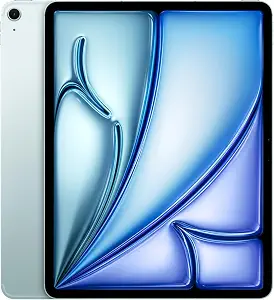 | Best Renewed Large-Screen Value | Model year: 2024 | Display: 13-inch Liquid Retina | Chip: Apple M2 | VIEW ON AMAZON | See Our Full Breakdown |
| Apple iPad Pro 13-inch (M5), 256GB, Wi-Fi 7, Space Black |  | Best Premium for Creative Coursework | Display: 13-inch Ultra Retina XDR | Chip: Apple M5 | Storage: 256GB | VIEW ON AMAZON | See Our Full Breakdown |
| Apple iPad Air 13-inch (M2), 128GB, Wi-Fi 6E, Space Gray |  | Best New Large-Screen Study Pick | Display: 13-inch Liquid Retina | Chip: Apple M2 | Storage: 128GB | VIEW ON AMAZON | See Our Full Breakdown |
| Apple iPad Pro (2024, 13-inch, Wi-Fi, 256GB, Space Black, Renewed) |  | Best Renewed Pro for a Big Screen | Model: iPad Pro (2024) | Screen size: 13 inches | Connectivity: Wi-Fi | VIEW ON AMAZON | See Our Full Breakdown |
| Apple iPad Pro 11-inch (M5, 2025), 512GB, Wi-Fi + Cellular, Space Black (Renewed Premium) |  | Best for Mobile, Storage-Heavy Study | Chip: Apple M5 | Display size: 11 inches | Storage: 512GB | VIEW ON AMAZON | See Our Full Breakdown |
| Apple iPad Air 13-inch (M4), 256GB, Wi-Fi 7, Space Gray |  | Best Large-Screen Value for Students | Chip: Apple M4 | Display: 13-inch Liquid Retina with P3 wide color, True Tone, and ultralow reflectivity | Storage: 256GB | VIEW ON AMAZON | See Our Full Breakdown |
| ipad pro vs ipad air for student | Storage | Connectivity | Display | Chip |
|---|---|---|---|---|
| Apple iPad Air 13-inch | 128GB | Wi-Fi | 13-inch Liquid Retina, 2048 × 2732, 600 nits | — |
| Apple iPad Air | 128GB | Wi-Fi 6E | 11-inch Liquid Retina with P3 wide color and True Tone | Apple M3 |
| Apple iPad Pro 11-inch | 256GB | Wi-Fi 7 with Apple N1 | 11-inch Ultra Retina XDR with ProMotion, P3 wide color, and True Tone | Apple M5 with Neural Accelerators |
| Apple iPad Pro 13-inch | 512GB | Wi-Fi + Cellular | 13-inch Ultra Retina XDR with ProMotion, P3 wide color, and True Tone | Apple M5 |
| Apple iPad Air 11-inch | 128GB | Wi-Fi 7 with Apple N1 | 11-inch Liquid Retina with P3 wide color, True Tone, and ultralow reflectivity | Apple M4 |
| Apple iPad Air 13-inch | 128GB | Wi-Fi 6E | 13-inch Liquid Retina | Apple M2 |
| Apple iPad Pro 13-inch | 256GB | Wi-Fi 7 with Apple N1 | 13-inch Ultra Retina XDR | Apple M5 |
| Apple iPad Air 13-inch | 128GB | Wi-Fi 6E, USB-C | 13-inch Liquid Retina | Apple M2 |
| Apple iPad Pro | 256GB flash memory | Wi-Fi | — | — |
| Apple iPad Pro 11-inch | 512GB | Wi-Fi + Cellular | — | Apple M5 |
| Apple iPad Air 13-inch | 256GB | Wi-Fi 7 with Apple N1 | 13-inch Liquid Retina with P3 wide color, True Tone, and ultralow reflectivity | Apple M4 |
More Details on Our Top Picks
Apple iPad Air 13-inch (2025), Wi-Fi, 128GB, Space Gray (Renewed)
I’d pick this renewed 13-inch Air for students who regularly keep lecture notes beside a textbook, research paper, or drawing canvas. Its large Liquid Retina display gives those materials more room than the 11-inch iPad Air M3, while the M3 chip and 8GB of RAM support switching between demanding apps. For most coursework, that balance makes more sense than the M5 iPad Pro’s higher-end display and processing headroom. The tradeoff is portability: at around 617g, it takes up more space in a backpack and is less comfortable to hold for long stretches. This listing is also renewed and has a 90-day limited warranty, so students who want a new device or longer warranty coverage should look elsewhere.
Pros:- 13-inch display leaves more room for split-screen coursework than the 11-inch Air models.
- M3 chip and 8GB RAM support responsive multitasking.
- 12MP ultrawide front camera with Center Stage helps keep students in frame on video calls.
- Aluminum body and 128GB storage suit everyday campus use.
Cons:- Around 617g makes it less portable than the 11-inch Air.
- Renewed condition may not suit buyers who want a new device.
- 90-day limited warranty offers less coverage than the one-year warranty listed for the renewed premium 13-inch Pro.
Best for: Students who frequently compare readings, write notes, or sketch in split-screen and are comfortable buying a renewed tablet.
Not ideal for: Students who prioritize a lightweight tablet for commuting or want a new device with longer warranty coverage.
- Display:13-inch Liquid Retina, 2048 × 2732, 600 nits
- Processor:Apple M3
- RAM:8GB
- Storage:128GB
- Connectivity:Wi-Fi
- Weight:Around 617g
- Cameras:12MP rear with 4K video; 12MP ultrawide front with Center Stage
- Condition and warranty:Renewed; 90-day limited warranty
Our verdict“Choose this renewed 13-inch Air if extra screen space matters more to your coursework than light carry weight or longer warranty coverage.”
Apple iPad Air (11-inch, Wi-Fi, 128GB, M3, Space Gray, Renewed)
For students who want an Air that is easier to carry between classes, this 11-inch M3 model keeps the core performance of the 13-inch Air while taking up less room. Its Liquid Retina screen has P3 wide color and True Tone, which can make long reading sessions and visual coursework more comfortable to view. Wi-Fi 6E and a USB-C port rated for transfers up to 10 Gb/s add useful flexibility for campus networks and moving files. Compared with the newer 11-inch Air M4, though, this renewed M3 listing gives up a chip generation and Wi-Fi 7. The listing does not specify battery life, weight, or included accessories, so students should check those details before buying; renewed condition also narrows its appeal.
Pros:- 11-inch size is easier to carry than the 13-inch Air models.
- M3 chip supports multitasking and creative coursework.
- P3 wide color and True Tone suit reading and visual projects.
- USB-C supports data transfers up to 10 Gb/s.
Cons:- Renewed condition may not fit buyers seeking a new tablet.
- M3 and Wi-Fi 6E are a generation behind the listed 11-inch M4 Air with Wi-Fi 7.
- Product data does not specify battery life, weight, or included accessories.
Best for: Students who prefer an 11-inch tablet for commuting and want M-series performance in a renewed Air.
Not ideal for: Students who need a large screen for side-by-side documents or prefer the newer M4 Air and Wi-Fi 7.
- Display:11-inch Liquid Retina with P3 wide color and True Tone
- Chip:Apple M3
- Storage:128GB
- Connectivity:Wi-Fi 6E
- Port:USB-C, up to 10 Gb/s
- Color:Space Gray
- Condition:Renewed
Our verdict“Pick this renewed 11-inch Air if carrying comfort matters more than a newer chip, Wi-Fi 7, or a larger study screen.”
Apple iPad Pro 11-inch (M5), 256GB, Space Black
This 11-inch Pro is the compact choice for students whose coursework calls for a more capable display and performance than the Air line provides. The Ultra Retina XDR screen with ProMotion is suited to detailed visual work, while the M5 chip and Neural Accelerators provide headroom for demanding apps and on-device AI. Compared with the 11-inch iPad Air M4, it also offers 256GB of storage, Face ID, and Wi-Fi 7. Those advantages matter most to design, video, or research workflows; for notes, readings, and standard campus apps, the Air is likely enough. The Pro’s Pencil and Magic Keyboard are separate purchases, and students who want a large canvas should compare it with the 13-inch Pro, which offers more workspace but a larger body.
Pros:- Ultra Retina XDR display with ProMotion, P3 wide color, and True Tone.
- M5 chip with Neural Accelerators supports demanding workflows and on-device AI.
- 256GB storage provides more room than the 128GB Air models.
- Wi-Fi 7 and Face ID add fast connectivity and convenient authentication.
Cons:- Apple Pencil and Magic Keyboard are separate accessories.
- Premium display and processing features may go unused in routine coursework.
- 11-inch screen gives less room for split-screen work than the 13-inch Pro.
Best for: Students doing demanding creative or technical work who want a premium display in an 11-inch tablet.
Not ideal for: Students focused on notes, readings, and standard coursework who would not use its display or processing advantages.
- Display:11-inch Ultra Retina XDR with ProMotion, P3 wide color, and True Tone
- Chip:Apple M5 with Neural Accelerators
- Storage:256GB
- Connectivity:Wi-Fi 7 with Apple N1
- Front camera:12MP Center Stage
- Rear camera:12MP Wide
- Authentication:Face ID
- Color:Space Black
Our verdict“Choose this Pro if demanding creative work justifies its display and M5 capabilities in a compact size.”
Apple iPad Pro 13-inch (M5, 2025), 512GB, Wi-Fi + Cellular, Space Black (Renewed Premium)
This renewed premium Pro is aimed at students who need a big canvas and frequent internet access away from campus Wi-Fi. Its 13-inch Ultra Retina XDR display with ProMotion gives visual projects and split-screen research more room, while the M5 chip and 512GB storage suit demanding apps and large files. Cellular connectivity is the standout distinction from the Wi-Fi-only 13-inch Air M4: it can keep connected work moving where Wi-Fi is unavailable, though cellular service requires its own plan. For ordinary notes and coursework, the smaller 11-inch M5 Pro is easier to carry and already offers Pro-level performance. This model is renewed premium, but the listing includes a one-year limited warranty; the Pencil and Magic Keyboard are compatible, not listed as included.
Pros:- 13-inch display provides room for split-screen work and detailed creative projects.
- M5 chip supports demanding workflows and on-device AI.
- 512GB storage accommodates larger project libraries.
- Wi-Fi and cellular connectivity support work away from wireless networks.
Cons:- Renewed premium condition may not suit buyers seeking a new device.
- Pencil and Magic Keyboard are compatible accessories but are not listed as included.
- Large 13-inch form factor is less convenient to carry than the 11-inch M5 Pro.
Best for: Students who edit large creative projects on the move and need cellular connectivity beyond campus Wi-Fi.
Not ideal for: Students who mainly study near Wi-Fi, want a lighter carry, or do not need 512GB storage.
- Display:13-inch Ultra Retina XDR with ProMotion, P3 wide color, and True Tone
- Chip:Apple M5
- Storage:512GB
- Connectivity:Wi-Fi + Cellular
- Color:Space Black
- Condition:Renewed Premium
- Included components:20W USB-C power adapter and USB-C charge cable
- Warranty:1-year limited warranty
Our verdict“Choose this renewed 13-inch Pro if you need a large creative workspace, substantial storage, and cellular access while away from Wi-Fi.”
Apple iPad Air 11-inch (M4), 128GB, Wi‑Fi 7, Space Gray
I’d make this the everyday pick for students who want a current Air that handles coursework without the Pro’s specialized screen. The M4 chip and all-day battery life suit app switching across a long study day, while the 11-inch Liquid Retina display keeps the tablet manageable in a backpack. Compared with the renewed 11-inch Air M3, this model adds Wi-Fi 7 and a newer chip; compared with the 11-inch M5 Pro, it gives up the Ultra Retina XDR display and Pro-level features. That is a sensible exchange for reading, writing, lectures, and most creative assignments. Its 128GB storage may constrain students with large offline media or project libraries, and the Pencil and Magic Keyboard are sold separately.
Pros:- M4 chip supports smooth multitasking and demanding tasks.
- 11-inch size is practical for carrying between classes.
- Wi-Fi 7 and all-day battery life suit a full campus day.
- 12MP Center Stage front camera and 4K-capable rear camera support calls and recording.
Cons:- 128GB may be limiting for large offline files and project libraries.
- Apple Pencil and Magic Keyboard are sold separately.
- Liquid Retina display lacks the Pro’s Ultra Retina XDR and ProMotion features.
Best for: Students who want a new 11-inch tablet for notes, readings, video calls, and everyday creative assignments.
Not ideal for: Students with large offline project libraries or demanding visual workflows that benefit from the M5 Pro display.
- Display:11-inch Liquid Retina with P3 wide color, True Tone, and ultralow reflectivity
- Chip:Apple M4
- Storage:128GB
- Connectivity:Wi-Fi 7 with Apple N1
- Front camera:12MP Center Stage
- Rear camera:12MP Wide with 4K video
- Security:Touch ID
- Battery life:All-day
Our verdict“Choose this Air for a current, portable study tablet if 128GB is enough and you do not need the Pro’s advanced display.”
Apple iPad Air 13-inch (2024), Wi-Fi, 128GB, Blue (Renewed Premium)
The 13-inch iPad Air gives students room for split-screen notes, readings, and lecture slides while keeping the M2 chip for demanding apps and graphics work. Its Apple Pencil Pro support makes handwritten annotation a strong fit, and Stage Manager can help organize coursework across windows. Compared with the Apple iPad Pro 13-inch (M5), this Air gives up the Pro’s XDR display and newer chip, but those upgrades matter less for everyday research and note-taking than the larger canvas does. The tradeoffs are its 128GB storage, which can fill with offline media and large projects, and its renewed condition; buyers should check the seller’s condition and return terms. This pick makes the most sense for students who want a large workspace and are comfortable choosing a renewed device.
Pros:- 13-inch display gives readings, notes, and split-screen apps more room
- M2 chip supports multitasking and graphics-heavy student apps
- Supports Apple Pencil Pro for handwritten notes and markup
- Wi-Fi 6E and USB-C provide modern wireless and wired connections
Cons:- 128GB may be limiting for large creative projects or extensive offline files
- Renewed Premium condition may show more variation than a new device
- Liquid Retina display lacks the Pro model’s Ultra Retina XDR features
Best for: Students who annotate textbooks, split the screen between lectures and notes, and are comfortable buying a renewed tablet.
Not ideal for: Students who need extensive local storage, a new device, or the Pro’s higher-end display for visual coursework.
- Model year:2024
- Display:13-inch Liquid Retina
- Chip:Apple M2
- Storage:128GB
- Connectivity:Wi-Fi 6E
- Ports:USB-C
- Security:Touch ID
- Condition:Renewed Premium
Our verdict“Choose this renewed Air for a spacious note-taking and study screen if 128GB and renewed condition suit your needs.”
Apple iPad Pro 13-inch (M5), 256GB, Wi-Fi 7, Space Black
For students whose coursework involves detailed illustration, video, or other demanding creative work, the 13-inch Ultra Retina XDR display with ProMotion and M5 chip offer more headroom than the iPad Air 13-inch (M2). That combination can make a large canvas feel more responsive and give complex tasks room to run, while 256GB leaves more space for project files than the Air’s 128GB configuration. Wi-Fi 7 and the landscape Center Stage camera also suit connected study and video calls. The premium hardware is harder to justify for students mainly reading PDFs, writing essays, and taking notes; the Air already covers those tasks. Apple Pencil and Magic Keyboard are separate purchases, so the total setup includes accessories beyond the tablet. This is the high-capability choice for students who will use its display and performance regularly.
Pros:- 13-inch Ultra Retina XDR display includes ProMotion, P3 wide color, and True Tone
- M5 chip supports demanding workflows and on-device AI tasks
- 256GB storage provides more room than the 128GB iPad Air models listed
- Wi-Fi 7 and landscape Center Stage camera support connected study and calls
Cons:- Apple Pencil and Magic Keyboard are sold separately
- Its advanced display and chip may go underused for routine coursework
- Nano-texture glass is limited to 1TB and 2TB configurations
Best for: Art, design, and media students who work with demanding apps and want a large, responsive display.
Not ideal for: Students focused on reading, essay writing, and basic note-taking who would not use the Pro display or M5 performance.
- Display:13-inch Ultra Retina XDR
- Chip:Apple M5
- Storage:256GB
- Connectivity:Wi-Fi 7 with Apple N1
- Front camera:12MP landscape Center Stage
- Rear camera:12MP Wide with adaptive True Tone flash
- Security:Face ID
- Weight:1.28 pounds
Our verdict“Pick this Pro if creative coursework will make regular use of its high-end display and M5 performance.”
Apple iPad Air 13-inch (M2), 128GB, Wi-Fi 6E, Space Gray
The 13-inch iPad Air with M2 suits students who want a broad workspace for lecture slides, split-screen research, and handwritten notes without stepping up to an iPad Pro. Its Liquid Retina display has P3 wide color and True Tone, and the landscape 12MP front camera with Center Stage helps keep a student in frame during video calls. Against the renewed blue iPad Air 13-inch (2024), this listing provides the same core M2, 128GB, and Wi-Fi 6E setup without identifying itself as renewed. Compared with the 13-inch iPad Pro (M5), it has a less advanced display and chip, but those differences are less relevant for standard coursework. The main constraints are 128GB of storage and separately sold Pencil and Magic Keyboard accessories, which add cost and planning to a student setup.
Pros:- 13-inch Liquid Retina display supports spacious reading and split-screen work
- M2 chip handles multitasking and graphics-intensive apps
- Landscape 12MP front camera supports Center Stage for video calls
- Works with Apple Pencil and Magic Keyboard accessories
Cons:- 128GB can constrain students keeping large files and media on the device
- Apple Pencil and Magic Keyboard are sold separately
- Display and chip are less advanced than on the iPad Pro 13-inch M5
Best for: Students who want a new 13-inch tablet for readings, split-screen study, video calls, and Pencil-based notes.
Not ideal for: Students who need more than 128GB for offline course materials or want Pro-level display features for creative work.
- Display:13-inch Liquid Retina
- Chip:Apple M2
- Storage:128GB
- Front camera:12MP Ultra Wide
- Rear camera:12MP Wide; supports 4K video
- Connectivity:Wi-Fi 6E, USB-C
- Security:Touch ID
- Battery:All-day battery life
Our verdict“Choose this Air for a large, capable study tablet if 128GB is enough and you do not need the Pro’s display upgrades.”
Apple iPad Pro (2024, 13-inch, Wi-Fi, 256GB, Space Black, Renewed)
This renewed 2024 13-inch iPad Pro pairs a large screen with 256GB of storage, giving students more room for files than the 128GB iPad Air 13-inch (M2). For coursework with large readings, downloaded lectures, or creative projects, that capacity can be useful, and the Pro designation points to a higher-end family than the Air. The supplied product data, however, does not identify the chip, display technology, camera details, or accessory compatibility, so I would not assume it matches the newer iPad Pro 13-inch (M5) feature for feature. The listing also specifies a renewed device and only Wi-Fi connectivity. It may fit a student who wants the large Pro form factor and can verify the exact condition and configuration, but buyers needing clear performance details have better-documented options in this roundup.
Pros:- 13-inch screen provides a large workspace for documents and coursework
- 256GB storage exceeds the 128GB capacity of the listed iPad Air models
- Wi-Fi connectivity supports campus and home networks
Cons:- Product details do not specify the chip or display technology
- Renewed condition may vary from a new device
- Wi-Fi-only configuration does not provide cellular access away from networks
Best for: Students seeking a renewed 13-inch iPad Pro with 256GB who can confirm the device details with the seller.
Not ideal for: Students who need documented chip and display specifications, a new device, or cellular connectivity.
- Model:iPad Pro (2024)
- Screen size:13 inches
- Connectivity:Wi-Fi
- Storage:256GB flash memory
- Color:Space Black
- Condition:Renewed
- Operating system:iOS
Our verdict“Consider this renewed Pro only if a large screen and 256GB matter more than having full specifications confirmed in the listing.”
Apple iPad Pro 11-inch (M5, 2025), 512GB, Wi-Fi + Cellular, Space Black (Renewed Premium)
The 11-inch iPad Pro with M5 is the compact choice here for students who carry their tablet between classes and need substantial local storage. Its 512GB capacity and Wi-Fi plus Cellular address two practical student needs: keeping large project files available and accessing the internet away from campus Wi-Fi. Compared with the 13-inch iPad Pro (M5), it takes up less space in a bag but offers a smaller workspace for side-by-side documents and detailed creative work. The provided listing does not state the display technology or camera specifications, so buyers should verify those details before relying on them for specialist coursework. Apple Pencil and Magic Keyboard are sold separately, and the Renewed Premium condition is another factor to weigh. This model fits mobile students who value storage and cellular access over the larger canvas.
Pros:- 512GB storage accommodates larger local project and course libraries
- Wi-Fi plus Cellular supports connectivity away from campus networks
- M5 chip is suited to demanding workflows and on-device AI
- 11-inch size is more compact to carry than the 13-inch Pro models
Cons:- Smaller display offers less room for split-screen coursework than 13-inch models
- Apple Pencil and Magic Keyboard are sold separately
- Renewed Premium condition and unspecified display details may require buyer verification
Best for: Students who travel between classes, need cellular access, and keep large course or creative files stored locally.
Not ideal for: Students who prefer a large screen for split-screen reading or want a new device with fully detailed specifications.
- Chip:Apple M5
- Display size:11 inches
- Storage:512GB
- Connectivity:Wi-Fi + Cellular
- Condition:Renewed Premium
- Operating system:iPadOS 26
- Color:Space Black
- Supported accessories:Apple Pencil Pro, Apple Pencil (USB-C), Magic Keyboard
Our verdict“Choose this renewed 11-inch Pro if you need cellular access and 512GB in a more portable study setup.”
Apple iPad Air 13-inch (M4), 256GB, Wi-Fi 7, Space Gray
For students who want room for lecture notes, split-screen reading, and creative assignments, this 13-inch iPad Air pairs a spacious display with the M4 chip and 256GB of storage. That extra screen area can make juggling a textbook and notes easier than on the 11-inch iPad Air (M4), while the Air design keeps the choice focused on study and general creative work. Compared with the 13-inch iPad Pro (M5), this model gives up the Pro tier’s positioning and costs less to equip as a student setup, though the supplied details do not specify a display refresh rate or other Pro-only advantages. Wi-Fi 7 supports newer wireless networks, and Touch ID makes unlocking straightforward. The main tradeoff is that Apple Pencil and Magic Keyboard are separate purchases; those accessories may be central to a paperless workflow.
Pros:- 13-inch display gives more room for split-screen notes and reading
- M4 chip is suited to multitasking and demanding coursework
- 256GB storage provides more space for files and creative projects than 128GB options
- Wi-Fi 7, Touch ID, and Center Stage front camera support convenient everyday study use
Cons:- Apple Pencil and Magic Keyboard are sold separately, adding to the cost of a complete study setup
- Larger size is less convenient to carry and use in tight classroom spaces than an 11-inch iPad Air
- No specific battery runtime is provided, making endurance harder to compare for long campus days
Best for: Students who regularly read course materials beside their notes, write longer assignments, or work on creative projects and want a large screen with 256GB of storage.
Not ideal for: Students who prioritize a lightweight, compact device for crowded lecture halls or commuting; the 11-inch iPad Air is the more portable fit.
- Chip:Apple M4
- Display:13-inch Liquid Retina with P3 wide color, True Tone, and ultralow reflectivity
- Storage:256GB
- Connectivity:Wi-Fi 7 with Apple N1
- Cameras:12MP Center Stage front camera; 12MP Wide rear camera with 4K video
- Security:Touch ID
- Battery:All-day battery life
- Operating system:iPadOS
Our verdict“Choose this iPad Air if a large canvas and generous storage matter more for your coursework than the portability of the 11-inch Air or the Pro tier.”

How We Picked
I ranked these iPads for student routines: reading, writing, research, video calls, note-taking, and creative projects. I weighed chip generation and expected performance headroom alongside screen size, portability, storage, connectivity, and whether a model is new or renewed. These factors show how well each configuration fits coursework and how much flexibility it offers as a student’s workload changes.
The Air models rank ahead for most students because they cover common academic needs without requiring Pro hardware. Within the Air group, newer generations and useful storage or screen combinations get the edge, while older and renewed versions remain alternatives when their condition and configuration fit the buyer. The Pro models rank as premium choices for workloads that can benefit from their capabilities; their larger screens, higher storage tiers, and cellular configurations serve specific needs, but those features do not help every student enough to make them the default pick.
| ipad pro vs ipad air for student | Connectivity | Chip |
|---|---|---|
| Apple iPad Air 13-inch | Wi-Fi | — |
| Apple iPad Air | Wi-Fi 6E | Apple M3 |
| Apple iPad Pro 11-inch | Wi-Fi 7 with Apple N1 | Apple M5 with Neural Accelerators |
| Apple iPad Pro 13-inch | Wi-Fi + Cellular | Apple M5 |
| Apple iPad Air 11-inch | Wi-Fi 7 with Apple N1 | Apple M4 |
| Apple iPad Air 13-inch | Wi-Fi 6E | Apple M2 |
| Apple iPad Pro 13-inch | Wi-Fi 7 with Apple N1 | Apple M5 |
| Apple iPad Air 13-inch | Wi-Fi 6E, USB-C | Apple M2 |
| Apple iPad Pro | Wi-Fi | — |
| Apple iPad Pro 11-inch | Wi-Fi + Cellular | Apple M5 |
| Apple iPad Air 13-inch | Wi-Fi 7 with Apple N1 | Apple M4 |
Factors to Consider When Choosing Ipad Pro Vs Ipad Air For Students
I’d start with how you study each day, then match the iPad’s size, storage, and connectivity to that routine. The model name alone won’t tell you whether a configuration is a good fit: a large screen can help with reading and split-screen work, while a compact model is easier to carry between classes.
Choose a screen size around your study habits
An 11-inch iPad is easier to carry and handle while commuting, taking notes, or working in lecture halls. A 13-inch model gives side-by-side apps and full-page readings more room, which can reduce how often you zoom or switch views. That extra workspace only pays off if you use it regularly; it also means carrying a larger device. Students who mostly type essays and browse course sites may find the smaller screen sufficient. Before choosing the larger size, think about where you will use it and whether it needs to fit alongside a laptop in your bag.
Match Pro performance to actual coursework
For lecture notes, research, document editing, and streaming, an Air is already aimed at the kind of work many students do. Pro hardware makes a stronger case for students who regularly edit demanding media, create detailed digital artwork, or rely on a more premium display. A common mistake is buying extra performance because it sounds more future-proof without naming a task that needs it. If your course uses specialist apps, check their requirements before deciding whether the Pro difference matters. Spend on the model that supports your workload, rather than assuming a higher tier makes ordinary academic tasks better.
Estimate storage from files you keep offline
Course documents and cloud-based notes can take relatively little space, while downloaded video, large design files, and extensive media libraries can fill storage faster. Consider how often you work without dependable internet and whether you keep lecture recordings or project files on the device. The 256GB Air option in this lineup gives more room than the 128GB configurations without requiring a Pro model for that capacity. Don’t assume storage can be expanded later with a memory card; plan around the iPad’s fixed capacity and your backup habits. If your major involves large creative projects, storage may matter more than a small difference in chip tier.
Treat renewed condition as part of the decision
Several Air and Pro choices here are renewed, so their generation and listed condition deserve attention alongside their specs. Read the seller’s description for battery, cosmetic condition, included accessories, and return terms before comparing a renewed device with a new one. A previous-generation iPad can handle ordinary coursework, but a newer model may offer a longer runway for demanding apps and future software needs. Avoid treating “renewed” as a single consistent condition across listings. Compare the actual configuration and seller details, and choose a source whose policies you understand.
Decide whether cellular connectivity solves a real problem
Cellular can help when you need online access away from campus Wi-Fi and do not want to rely on a phone hotspot. It does not make the iPad faster at offline tasks, and using cellular service may involve a separate plan. Students with dependable Wi-Fi at home and school can often manage with a Wi-Fi model. Think about fieldwork, travel, and where you expect to study before paying for a cellular configuration. If you rarely lose access to Wi-Fi, storage or a more suitable screen size may serve you better.
Frequently Asked Questions
Is an iPad Air enough for a student who already owns a laptop?
For many students, yes: an Air can handle reading, handwritten notes, research, and quick document edits alongside a laptop. The tablet is most useful when its portability or pen input changes how you study, rather than when it duplicates every laptop task. Check whether your course software runs well on iPadOS before treating it as a substitute for a computer. If assignments require desktop-only programs, keep the laptop as your main work device. In that setup, an Air is usually easier to justify than a Pro.
Would the 13-inch Air be better than an 11-inch Pro for studying?
It depends on whether workspace or display and performance capabilities matter more in your routine. The 13-inch Air gives more room for a textbook beside notes or a document beside a reference page, which can be helpful during long study sessions. The 11-inch Pro is more compact and targets students who want Pro-level features in a smaller tablet. A larger screen does not automatically improve every task, especially if you mostly take quick notes in class. Choose based on the apps and layouts you will use most often.
Should I choose a renewed iPad over a newer model?
A renewed model can be a reasonable choice when its generation, storage, and condition suit your needs and the seller provides clear return terms. For basic notes and coursework, an older Air may still cover the essentials. A newer model may be the better fit if you expect heavier creative work or want more performance headroom for later coursework. Compare battery condition and included accessories rather than relying on the model name alone. If the listing leaves those details unclear, I’d favor a better-documented option.
Do students need an iPad with cellular connectivity?
Most students can decide this by looking at where they study and how dependable their Wi-Fi access is. Cellular is useful for fieldwork, travel, or long stretches away from Wi-Fi when a phone hotspot is inconvenient. It does not improve performance for downloaded notes, documents, or other offline work. Also account for the separate service plan that cellular use may require. If you mainly work on campus or at home, a Wi-Fi model is likely the simpler fit.
Is the iPad Pro worth choosing for art, design, or video coursework?
It can be, when the display and performance advantages support work you do often, such as detailed illustration or demanding video projects. Students doing occasional creative assignments may find an Air more practical, especially if their main tasks remain reading and note-taking. Check the requirements of your key apps and the size of the files you expect to create before choosing. Storage also matters: a Pro with more capacity may suit project-heavy courses better than a lower-storage configuration. If your work is mostly academic documents, the Pro’s premium features may see little use.
Conclusion
For most students, my best overall recommendation is the 11-inch iPad Air M4; its size and current performance make a balanced study companion. Pick the 13-inch iPad Air M4 as best value for a larger workspace if split-screen study and its 256GB capacity match your routine. The 11-inch iPad Air M3 is a sensible beginner pick for students who want a straightforward tablet for notes and coursework, while the 13-inch iPad Pro M5 is my best premium choice for demanding creative work and a spacious display. For frequent work away from Wi-Fi, look at the cellular Pro configurations; if you are buying renewed, compare the listing condition and storage carefully. Choose the Air for everyday study, and move to Pro when you can point to a specific task that benefits from its added capabilities.