
The best overall ergonomic split keyboard for programmers in this roundup is the Kinesis Advantage360 Professional, a premium choice for people prioritizing an adjustable, deeply ergonomic layout. The Kinesis Freestyle Edge RGB Plus stands out for mechanical keys and flexible placement, while the Logitech ERGO K860 offers a simpler wireless setup with an integrated wrist rest. The main tradeoffs are learning curve versus familiarity, compact layouts versus dedicated number keys, and advanced customization versus straightforward setup. Read on for how all 13 options compare and which fits your coding habits.

Get the little things that make your day delivered free with Prime
- Fast, free delivery on millions of items
- Prime Video, Amazon Music and more included
- Member-only deals all year
Key Takeaways
- The Kinesis Advantage360 Professional leads for programmers seeking a premium split layout, but its specialized design may ask more of new users than a conventional keyboard.
- The Freestyle Edge RGB Plus pairs mechanical switches with separate halves, giving programmers more placement freedom than integrated split boards.
- The Logitech ERGO K860 favors familiar typing and wireless convenience over the mechanical customization available from the Kinesis and Cloud Nine models.
- Several options trade a full programming-friendly layout for portability or compactness, including the 58-key Corne, which may require more layers and shortcuts.
- Arteck and SABLUTE focus on accessible everyday use, while the wired mechanical and ergonomic Kinesis models serve buyers with more specific preferences.
| RK ROYAL KLUDGE S70 Ergonomic Split Mechanical Keyboard, Tactile Brown Switches, Black |  | Best for Programmers Who Want Mechanical Customization | Layout: 75% QWERTY | Keys: 74 | Switches: Tactile brown; hot-swappable 3-pin and 5-pin | VIEW ON AMAZON | See Our Full Breakdown |
| Arteck Split Ergonomic Wireless Keyboard with Palm Rest |  | Best for Simple, Low-Maintenance Desk Setups | Layout: QWERTY | Keys: 102 | Switch type: Scissor switch | VIEW ON AMAZON | See Our Full Breakdown |
| Kinesis Freestyle2 Ergonomic USB-A Keyboard with VIP3 Lifters for PC |  | Best for Adjustable Tenting and Number-Heavy Work | Model: KB820PB-US | Layout and keys: Windows QWERTY; 94 keys | Sections: 2 | VIEW ON AMAZON | See Our Full Breakdown |
| Arteck Split Ergonomic Wireless Keyboard with Cushioned Wrist Rest |  | Best for Switching Between Multiple Devices | Layout: QWERTY | Switch type: Mechanical, Cherry MX Brown | Connectivity: Bluetooth, 2.4 GHz USB-A, 2.4 GHz USB-C | VIEW ON AMAZON | See Our Full Breakdown |
| Arteck Split Ergonomic Wired Backlit Keyboard with Palm Rest | 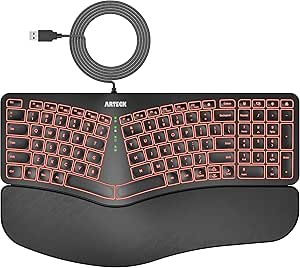 | Best Wired Pick for Backlit Typing | Model: HA315B | Layout and keys: QWERTY; 101 keys | Switch type: Scissor switch | VIEW ON AMAZON | See Our Full Breakdown |
| Kinesis Advantage360 Professional Split Ergonomic Keyboard |  | Best for Long Coding Sessions | Connectivity: Bluetooth | Switches: Kailh Box Pink Silent linear | Layout and key count: QWERTY, 76 keys | VIEW ON AMAZON | See Our Full Breakdown |
| Frixalox Wired Ergonomic Split Keyboard with RGB Backlight and Number Pad |  | Best Full-Size Wired Pick | Connection: Wired USB-A; USB-C adapter included | Layout and key count: Full-size QWERTY, 120 keys | Switch type: Membrane | VIEW ON AMAZON | See Our Full Breakdown |
| KINESIS Freestyle Edge RGB Plus Split Mechanical Keyboard with Linear Switches |  | Best for Mechanical Customization | Switch type: Hotswappable mechanical linear | Layout: AZERTY | Key count: 174 | VIEW ON AMAZON | See Our Full Breakdown |
| Cloud Nine C989M Ergonomic Split Mechanical Keyboard with Kailh Brown Switches |  | Best for Macros and Numeric Entry | Switch type: Kailh Brown tactile | Layout and key count: QWERTY, 104 keys | Maximum separation: 8 inches | VIEW ON AMAZON | See Our Full Breakdown |
| Logitech ERGO K860 Wireless Ergonomic Split Keyboard with Wrist Rest |  | Best for Split-Keyboard Beginners | Connectivity: Bluetooth, USB receiver | Layout and key count: Full-size QWERTY, 105 keys | Compatible operating systems: Windows, macOS, Linux, Chrome OS | VIEW ON AMAZON | See Our Full Breakdown |
| SABLUTE Rechargeable Ergonomic Wireless Keyboard and Mouse Combo |  | Best for Full-Size Wireless Comfort | Layout: Full-size split QWERTY with number pad | Connectivity: 2.4GHz wireless | Operating systems: Windows and macOS | VIEW ON AMAZON | See Our Full Breakdown |
| Corne Wired Ergonomic Split Mechanical Keyboard with Knobs, 58 Keys, Hot-Swappable, RGB, Silent Linear Switches |  | Best for Programmable Compact Layouts | Layout: 4×6 column-staggered split QWERTY | Keys and controls: 58 keys and 2 knobs | Connectivity: Wired USB-C | VIEW ON AMAZON | See Our Full Breakdown |
| RK Royal Kludge S70 75% Ergonomic Split Mechanical Keyboard |  | Best for Wireless Mechanical Versatility | Layout: 75% QWERTY | Keys: 74 | Connectivity: 2.4GHz wireless, Bluetooth, and USB-C | VIEW ON AMAZON | See Our Full Breakdown |
| ergonomic split keyboards for programmer | Connectivity | Layout | Switch type |
|---|---|---|---|
| RK ROYAL KLUDGE S70 Ergonomic | 2.4 GHz wireless, Bluetooth, USB-C | 75% QWERTY | — |
| Arteck Split Ergonomic Wireles | 2.4 GHz USB wireless | QWERTY | Scissor switch |
| Kinesis Freestyle2 Ergonomic U | USB-A; USB powered | — | Membrane |
| Arteck Split Ergonomic Wireles | Bluetooth, 2.4 GHz USB-A, 2.4 GHz USB-C | QWERTY | Mechanical, Cherry MX Brown |
| Arteck Split Ergonomic Wired B | USB wired | — | Scissor switch |
| Kinesis Advantage360 Professio | Bluetooth | — | — |
| Frixalox Wired Ergonomic Split | — | — | Membrane |
| KINESIS Freestyle Edge RGB Plu | USB-A | AZERTY | Hotswappable mechanical linear |
| Cloud Nine C989M Ergonomic Spl | — | — | Kailh Brown tactile |
| Logitech ERGO K860 Wireless Er | Bluetooth, USB receiver | — | — |
| SABLUTE Rechargeable Ergonomic | 2.4GHz wireless | Full-size split QWERTY with number pad | — |
| Corne Wired Ergonomic Split Me | Wired USB-C | 4×6 column-staggered split QWERTY | — |
| RK Royal Kludge S70 75% Ergono | 2.4GHz wireless, Bluetooth, and USB-C | 75% QWERTY | — |
More Details on Our Top Picks
RK ROYAL KLUDGE S70 Ergonomic Split Mechanical Keyboard, Tactile Brown Switches, Black
The S70 suits programmers who want a split layout without giving up mechanical switches or wireless flexibility. Its adjustable tenting feet and fixed wrist rest offer a more supported setup than the simpler Arteck split keyboards, while hot-swappable switches let you change the typing feel without soldering. Bluetooth, 2.4 GHz, and USB-C connections also make it easier to move between a desktop and other devices.
The tradeoff is that its 75% layout has 74 keys, so programmers who rely on a dedicated number pad may prefer the Kinesis Freestyle2. Its two-week battery estimate applies with backlighting off, and the macro customization software is for Windows. I’d choose the S70 for switch flexibility and programmable keys, not for a plug-and-forget wireless setup with every feature enabled.
Pros:- Hot-swappable sockets support 3-pin and 5-pin switches without soldering.
- Adjustable feet and a fixed wrist rest support a more tailored typing position.
- Bluetooth, 2.4 GHz, and USB-C provide flexible connection choices.
- Five programmable macro keys can put repeated commands within reach.
Cons:- The 74-key layout lacks a dedicated number pad.
- The stated battery life is up to two weeks only with backlighting off.
- Macro remapping software is for Windows.
Best for: Programmers who want a compact mechanical split keyboard, adjustable tenting, hot-swappable switches, and multiple connection options.
Not ideal for: Programmers who need a dedicated number pad, use macOS for macro remapping, or want long battery life with RGB lighting enabled.
- Layout:75% QWERTY
- Keys:74
- Switches:Tactile brown; hot-swappable 3-pin and 5-pin
- Connectivity:2.4 GHz wireless, Bluetooth, USB-C
- Battery:3150 mAh; up to two weeks with backlight off
- Ergonomic features:Split design, adjustable feet, fixed wrist rest
- Programmable keys:5 macro keys
- Backlighting:RGB
- Compatible operating systems:Windows, Mac, Android
Our verdict“Choose the S70 if you want a customizable mechanical split keyboard with wireless options, and skip it if you depend on a number pad or Windows-only macro software is a problem.”
Arteck Split Ergonomic Wireless Keyboard with Palm Rest
The Arteck is the straightforward choice for programmers who want a split keyboard and cushioned palm support without mechanical-switch customization. Its 102-key QWERTY layout keeps a full set of keys close at hand, unlike the more compact RK ROYAL KLUDGE S70. The included USB receiver also makes setup simple on a Windows desktop or laptop: plug it in and use the keyboard without managing Bluetooth pairing.
That simplicity comes with narrower compatibility and connection options. It is Windows-only in the supplied specifications and depends on a USB-A port, while the S70 offers Bluetooth and USB-C as alternatives. The six-month battery estimate is based on two hours of typing per day, so heavier programming use may mean more frequent charging. I’d pick this Arteck for a familiar full-size layout and uncomplicated wireless use, not for mechanical feedback or multi-device workflows.
Pros:- Full 102-key QWERTY layout retains a familiar set of keys.
- Split design and cushioned wrist rest support a more relaxed hand position.
- Rechargeable battery is rated for up to six months at two hours of daily use.
- Included 2.4 GHz USB receiver offers uncomplicated setup.
Cons:- Compatibility is listed for Windows only.
- The USB receiver requires an available USB port.
- Scissor switches offer less switch customization than the mechanical RK ROYAL KLUDGE S70.
Best for: Windows programmers who want a full-size split keyboard with cushioned wrist support and simple USB-receiver setup.
Not ideal for: Mac or Linux programmers, and anyone who needs Bluetooth, USB-C receiver connectivity, or mechanical switches.
- Layout:QWERTY
- Keys:102
- Switch type:Scissor switch
- Connectivity:2.4 GHz USB wireless
- Battery:Rechargeable; up to six months based on two hours of use per day
- Dimensions:16.5 × 9.6 × 1.02 inches
- Ergonomic features:Split design and cushioned wrist rest
- Compatible operating system:Windows
- Included accessories:Nano USB receiver and USB-C charging cable
Our verdict“Choose this Arteck for a full-size, receiver-based Windows setup with a cushioned rest, but look elsewhere if you need broader OS support or mechanical switches.”
Kinesis Freestyle2 Ergonomic USB-A Keyboard with VIP3 Lifters for PC
The Freestyle2 is the strongest fit here for programmers who want to tune the distance and angle between the two keyboard halves. They can separate by up to 9 inches, and the included VIP3 lifters offer three tenting angles. That gives it more explicit positioning adjustment than the fixed split arrangement of the Arteck wireless models. A numeric keypad and multimedia shortcuts also make this a practical pick for code work that includes frequent data entry.
Its low-force membrane switches favor a lighter keystroke over the mechanical feel and switch swapping of the RK ROYAL KLUDGE S70. The Freestyle2 is also wired through USB-A, which limits desk placement and requires a compatible port. I’d rank it ahead of simpler split boards for users prioritizing tenting and separation, but not for anyone seeking wireless convenience or mechanical customization.
Pros:- Keyboard halves separate by up to 9 inches for flexible hand placement.
- VIP3 lifters provide 5, 10, or 15-degree tenting options.
- Includes a numeric keypad, multimedia keys, and shortcut keys.
- Low-force membrane switches are designed to reduce finger effort.
Cons:- USB-A wired connectivity restricts placement and requires a suitable port.
- Membrane switches do not offer the mechanical feel or switch swapping of the RK ROYAL KLUDGE S70.
- Its 19-inch width and numeric keypad take up more desk space than compact options.
Best for: Windows or Linux programmers who want adjustable separation and tenting, low-force keys, and a dedicated numeric keypad.
Not ideal for: Programmers seeking wireless connectivity, hot-swappable mechanical switches, or a compact keyboard footprint.
- Model:KB820PB-US
- Layout and keys:Windows QWERTY; 94 keys
- Sections:2
- Maximum separation:9 inches
- Tenting angles:5, 10, or 15 degrees
- Switch type:Membrane
- Connectivity:USB-A; USB powered
- Compatible operating systems:Windows, Linux
- Included ergonomic accessories:VIP3 tenting accessory and cushioned palm supports
Our verdict“Choose the Freestyle2 if adjustable tenting, split spacing, and a number pad matter more than wireless use or mechanical switches.”
Arteck Split Ergonomic Wireless Keyboard with Cushioned Wrist Rest
This Arteck stands apart from the other wireless Arteck in this batch by pairing a mechanical switch design with connections for up to three devices. Bluetooth and the included USB-A and USB-C receivers give programmers options for a desktop, laptop, or tablet, and one-click switching reduces the friction of moving between them. The cushioned wrist rest and split layout make it more desk-oriented than a compact travel keyboard.
The first Arteck is simpler, with a scissor-switch design and a single USB receiver; this model is better suited to programmers who value device flexibility and mechanical keys. Its stated six-month battery life assumes two hours of daily use, so long coding sessions may shorten that interval. Compatibility is listed for Windows and Android, not macOS or Linux, which limits its appeal for some developer setups.
Pros:- Connects to up to three devices through Bluetooth, USB-A, or USB-C wireless receivers.
- One-click device switching suits multi-device desk setups.
- Mechanical Cherry MX Brown switches provide a different typing feel from the scissor-switch Arteck.
- Cushioned wrist rest and split layout support a relaxed hand position.
Cons:- Compatible operating systems are listed as Windows and Android only.
- The six-month battery estimate is based on just two hours of daily use.
- The supplied specifications do not state tenting adjustment or hot-swappable switches.
Best for: Programmers who work across up to three Windows or Android devices and want one-click switching with a split layout.
Not ideal for: Mac or Linux users, or programmers who need a clearly specified adjustable tenting system or a battery estimate based on heavier daily use.
- Layout:QWERTY
- Switch type:Mechanical, Cherry MX Brown
- Connectivity:Bluetooth, 2.4 GHz USB-A, 2.4 GHz USB-C
- Device capacity:Up to 3 devices
- Battery:Rechargeable lithium battery; up to six months at two hours of daily use
- Compatible operating systems:Windows, Android
- Compatible devices:PC, desktop, laptop, tablet
- Included accessories:USB-A receiver, USB-C receiver, USB-C charging cable
- Warranty:24 months
Our verdict“Choose this Arteck if you switch among several Windows or Android devices and want mechanical keys, but skip it if you need macOS or Linux support.”
Arteck Split Ergonomic Wired Backlit Keyboard with Palm Rest
The HA315B makes the most sense for a Windows programmer who wants split ergonomics, a cushioned rest, and visible keys in a dim workspace without dealing with wireless pairing. Its seven backlight colors and three brightness levels provide more lighting control than the non-backlit Arteck wireless keyboard. The 1.8 m USB cable keeps setup simple and avoids battery charging, though it also fixes the keyboard’s position relative to the computer.
Compared with the mechanical RK ROYAL KLUDGE S70, this model uses scissor switches and offers less customization; it is a simpler typing tool, not a switch-tuning platform. Its 101-key layout retains a broad set of keys, but the supplied compatibility information lists Windows only. The keyboard is also not water resistant, a meaningful limitation on a busy desk. I’d choose it for wired reliability and adjustable backlighting, not for flexible placement or spill tolerance.
Pros:- Split design includes a cushioned wrist and palm rest.
- Seven backlight colors and three brightness levels allow lighting adjustment.
- USB connection avoids wireless pairing and battery charging.
- 101-key QWERTY layout keeps a broad selection of keys available.
Cons:- The 1.8 m cable limits placement flexibility compared with the wireless Arteck options.
- Compatibility is listed for Windows only.
- Not water resistant, and its scissor switches are not hot-swappable.
Best for: Windows programmers who prefer a wired connection, want adjustable backlighting, and value a cushioned wrist and palm rest.
Not ideal for: Mac or Linux programmers, people who need wireless placement flexibility, or anyone who wants water resistance or mechanical switch customization.
- Model:HA315B
- Layout and keys:QWERTY; 101 keys
- Switch type:Scissor switch
- Connectivity:USB wired
- Cable length:1.8 m (6 ft)
- Backlighting:7 colors; 3 brightness levels
- Compatible operating system:Windows
- Water resistance:Not water resistant
- Warranty:24 months
Our verdict“Choose the HA315B for a backlit, wired Windows workstation with cushioned support, but skip it if you need wireless freedom or spill protection.”
Kinesis Advantage360 Professional Split Ergonomic Keyboard
The Advantage360 is the most posture-focused choice in this group: its concave key wells, thumb keys, and adjustable tenting are designed to reduce the reach and wrist rotation involved in conventional typing. Compared with the Logitech ERGO K860, it offers a more distinctly mechanical, programmable layout and lets you separate the halves by up to 10 inches; the Logitech is easier to approach if you prefer a familiar full-size layout. Quiet Kailh Box Pink Silent switches suit shared offices, while broad operating-system support is useful for programmers moving between machines. The tradeoff is a substantial learning curve, and the premium palm pads are sold separately. Its single-color optional backlighting is also less flexible than the RGB lighting on the Cloud Nine C989M.
Pros:- Concave wells and thumb keys can reduce finger travel compared with a conventional layout.
- Three tenting levels and up to 10 inches of separation allow a highly adjustable setup.
- Quiet linear switches are suited to shared workspaces.
- Programmable layout and compatibility with major operating systems suit varied programming setups.
Cons:- The contoured layout can require a significant adjustment period.
- Premium palm pads are sold separately.
- Optional backlighting is single color rather than customizable RGB.
Best for: Programmers who spend long stretches typing and are ready to adapt to a contoured, programmable layout with adjustable tenting.
Not ideal for: First-time split-keyboard buyers who want a familiar, low-adjustment layout or anyone who expects premium palm pads to be included.
- Connectivity:Bluetooth
- Switches:Kailh Box Pink Silent linear
- Layout and key count:QWERTY, 76 keys
- Tenting:3 adjustable levels
- Maximum split distance:Up to 10 inches with included cable
- Operating systems:Windows 7–11, macOS, Linux, Chrome
- Dimensions:15 × 8 × 3 inches
- Warranty:3 years
Our verdict“Choose the Advantage360 if posture-focused shaping and quiet programmability matter more than a quick adjustment period or included premium palm pads.”
Frixalox Wired Ergonomic Split Keyboard with RGB Backlight and Number Pad
The Frixalox is a practical option for programmers who want a number pad, dedicated shortcuts, and a wired connection without moving to a mechanical or compact board. Its integrated wrist rest and adjustable kickstands offer basic ergonomic support, but this is a full-size membrane keyboard, not an independently separated pair of halves like the Kinesis Advantage360. That distinction matters if you want to set each hand at a different distance or angle. The 120-key layout keeps numeric entry and familiar navigation keys close at hand, and plug-and-play USB avoids battery management. RGB effects add customization, though they do less for typing posture than the tenting and contoured wells on the Advantage360. Shortcut behavior can vary by operating system, so programmers who switch platforms may prefer a simpler control scheme.
Pros:- Full-size QWERTY layout includes a number pad and 17 dedicated shortcuts.
- Integrated wrist rest and adjustable kickstands provide basic ergonomic support.
- Wired USB connection needs no batteries or driver setup.
- Works with Windows, macOS, Chrome OS, and Linux.
Cons:- Membrane switches offer less switch customization than the mechanical Kinesis and Cloud Nine options.
- The full-size fixed layout does not offer the separation flexibility of the Advantage360.
- Shortcut functions may differ when changing operating systems.
Best for: Programmers who need a familiar full-size layout with a number pad, wired reliability, and basic wrist and tilt support.
Not ideal for: Buyers seeking independently positioned keyboard halves, mechanical switches, or consistent dedicated-shortcut behavior across operating systems.
- Connection:Wired USB-A; USB-C adapter included
- Layout and key count:Full-size QWERTY, 120 keys
- Switch type:Membrane
- Lighting:RGB, 17 effects and 5 brightness levels
- Dedicated shortcuts:17 multimedia and function keys
- Adjustable tilt:2 pairs of kickstands
- Dimensions:17.1 × 9.4 × 1.1 inches
- Compatibility:Windows, macOS, Chrome OS, Linux
Our verdict“Pick the Frixalox if you want a wired, full-size office keyboard with basic ergonomic features, not a highly adjustable split setup.”
KINESIS Freestyle Edge RGB Plus Split Mechanical Keyboard with Linear Switches
The Freestyle Edge RGB Plus suits programmers who want a split mechanical board with room to customize, including hotswappable linear switches, programmable controls, a lift kit, and detachable palm support. Compared with the Cloud Nine C989M, it emphasizes switch swapping and included setup accessories rather than a built-in numeric keypad and macro keys. Its split format gives each hand more placement freedom than the fixed full-size Frixalox, while USB-A keeps the connection straightforward. The key caveat is the listed AZERTY layout, which will be a poor fit for programmers accustomed to QWERTY unless they specifically want that arrangement. Compatibility is listed for PC and Windows 10 or later, making it a less flexible choice for mixed operating-system desks than the Kinesis Advantage360.
Pros:- Hotswappable linear switches allow switch changes without replacing the keyboard.
- Split design provides more hand-placement freedom than a fixed full-size board.
- Detachable palm support and lift kit are included.
- RGB lighting and programmable controls support layout customization.
Cons:- AZERTY layout may not suit programmers who use QWERTY.
- Listed compatibility is limited to PC and Windows 10 or later.
- USB-A connection is wired rather than wireless.
Best for: Windows-based programmers who want a split mechanical keyboard, hotswappable linear switches, and included palm and lift accessories.
Not ideal for: QWERTY typists or programmers who need clearly stated support for macOS, Linux, or multiple computer platforms.
- Switch type:Hotswappable mechanical linear
- Layout:AZERTY
- Key count:174
- Connectivity:USB-A
- Compatibility:PC; Windows 10 or later
- Features:RGB lighting, fully programmable
- Included accessories:Detachable palm support, lift kit, Mac keycaps
- Model number:KB975-LIN
Our verdict“Choose the Freestyle Edge RGB Plus if you use AZERTY on Windows and value switch swapping and included ergonomic accessories.”
Cloud Nine C989M Ergonomic Split Mechanical Keyboard with Kailh Brown Switches
The C989M combines a full-size split layout, tactile switches, and 10 programmable macro keys, making it a strong fit for programmers who also enter numbers or rely on repeatable commands. Unlike the Kinesis Advantage360, it keeps a conventional QWERTY arrangement and adds a numeric keypad, which can make the move to split typing less disruptive. Its two sections separate by up to 8 inches, with built-in tenting and palm supports, but the 28.6-inch width takes substantial desk space. Tactile Kailh Brown switches give more feedback than the Advantage360’s silent linear switches, but they may be less suitable for quiet shared rooms. The listed Windows compatibility is another limit for developers who regularly move between operating systems.
Pros:- Adjustable separation and built-in tenting support a more adaptable hand position.
- Tactile switches provide feedback while typing.
- Ten programmable macro keys can keep repeated commands within reach.
- Full-size layout includes a numeric keypad and USB pass-through.
Cons:- Its 28.6-inch width requires substantial desk space.
- Compatibility is listed for Windows, limiting appeal for mixed-platform setups.
- Tactile switches may be less quiet than the Advantage360’s silent linear switches.
Best for: Windows programmers who want a familiar QWERTY mechanical layout, numeric keypad, and dedicated macro keys for repeated tasks.
Not ideal for: Desk-space-conscious buyers, users who need documented macOS or Linux compatibility, or people who prefer quiet linear switches.
- Switch type:Kailh Brown tactile
- Layout and key count:QWERTY, 104 keys
- Maximum separation:8 inches
- Wrist rest angle:7 degrees
- Backlighting:RGB
- Programmable macro keys:10
- Connectivity and pass-through:USB; 1 USB 2.0 pass-through port
- Dimensions:28.6 × 9.1 × 2 inches
Our verdict“Choose the C989M if you want tactile mechanical typing, macro keys, and a number pad and have room for its wide footprint.”
Logitech ERGO K860 Wireless Ergonomic Split Keyboard with Wrist Rest
The ERGO K860 is the easiest starting point here for programmers who want ergonomic shaping without immediately learning a contoured or mechanical layout. Its curved keyframe, scooped keys, and pillowed wrist rest keep the familiar full-size QWERTY arrangement, while Bluetooth and a USB receiver suit desks where a cable is inconvenient. Compared with the Kinesis Advantage360, the Logitech is less specialized: it lacks the Advantage360’s concave key wells, thumb-key emphasis, and programmable mechanical setup. In exchange, its familiar layout asks less of new split-keyboard users. Three palm-lift angles allow changes for seated or standing positions, though the keyboard’s halves are part of one curved frame rather than independently placed units. It runs on two batteries and has no listed backlighting, unlike the RGB Cloud Nine C989M.
Pros:- Familiar full-size QWERTY layout offers a gentler introduction to ergonomic typing.
- Bluetooth and USB receiver provide two wireless connection options.
- Adjustable palm lift supports different desk and posture preferences.
- Compatible with Windows, macOS, Linux, and Chrome OS.
Cons:- Uses two batteries rather than a rechargeable power source.
- No backlighting is listed.
- The curved frame does not let users position the two sides independently like the Advantage360.
Best for: Programmers moving from a standard keyboard who want a familiar full-size layout, wireless connections, and an integrated wrist rest.
Not ideal for: Mechanical-keyboard enthusiasts, buyers who need independently positioned halves, or anyone who wants backlighting or rechargeable power.
- Connectivity:Bluetooth, USB receiver
- Layout and key count:Full-size QWERTY, 105 keys
- Compatible operating systems:Windows, macOS, Linux, Chrome OS
- Palm lift angles:0°, -4°, -7°
- Power:Requires 2 batteries
- Dimensions:17.95 × 9.17 × 1.89 inches
- Color:Graphite
- Recycled plastic content:71% of plastic parts
Our verdict“Choose the ERGO K860 if you want a familiar wireless ergonomic layout before committing to a more specialized split mechanical keyboard.”
SABLUTE Rechargeable Ergonomic Wireless Keyboard and Mouse Combo
The SABLUTE suits programmers who want a familiar full-size split QWERTY layout with a number pad, wrist support, and a bundled mouse. Its cushioned rest and adjustable tilt offer more setup flexibility than a conventional flat keyboard, while the mouse’s adjustable DPI and navigation buttons make it a practical everyday pairing. Compared with the compact Corne 58-key, SABLUTE avoids a steep key-remapping and adaptation period, but takes up far more desk space and offers less scope for programming custom layers. The 2.4GHz connection keeps the desk free of a cable between the keyboard and computer, though its USB-A receiver may need the included adapter on newer USB-C-only laptops. Choose it for familiar, extended typing sessions—not for mechanical-switch customization or a small workstation.
Pros:- Full-size split QWERTY layout retains a number pad for data entry and shortcuts.
- Cushioned wrist rest and adjustable tilt allow some adjustment to typing posture.
- Rechargeable keyboard and mouse reduce the need for disposable batteries.
- Mouse offers adjustable DPI and forward/back navigation buttons.
Cons:- The 19-inch-wide keyboard and full-size layout require substantial desk space.
- The 2.4GHz receiver is USB-A, so USB-C-only computers need the included adapter.
- Unlike the Corne and RK Royal Kludge S70, it does not offer mechanical switches or programmable keys.
Best for: Programmers who want a familiar full-size layout, a number pad, wrist support, and a wireless keyboard-and-mouse setup for a roomy desk.
Not ideal for: Programmers with a compact desk or USB-C-only computer who want a small mechanical keyboard or extensive key remapping.
- Layout:Full-size split QWERTY with number pad
- Connectivity:2.4GHz wireless
- Operating systems:Windows and macOS
- Keyboard dimensions:19 × 10.45 × 1.88 inches
- Weight:3.4 pounds
- Keyboard standby:Up to 250 hours
- Mouse standby:Up to 350 hours
- Included connection accessories:USB-A receiver and USB-C adapter
Our verdict“Choose the SABLUTE if you want a roomy, familiar wireless split keyboard with a number pad and mouse, and skip it if desk space or mechanical customization matters more.”
Corne Wired Ergonomic Split Mechanical Keyboard with Knobs, 58 Keys, Hot-Swappable, RGB, Silent Linear Switches
The Corne is the most compact and customization-focused option in this group: its 58-key column-staggered split layout, thumb keys, and two knobs make desk placement and custom key layers central to the experience. Vial lets programmers remap every key, while hot-swappable linear switches allow switch changes without soldering. That flexibility has a learning cost: the supplied guidance calls for one to two weeks of adaptation, and beginners may find remapping less straightforward than using the familiar 75% layout of the RK Royal Kludge S70. The Corne also needs cables between its halves and to the computer, unlike wireless choices such as the S70 or SABLUTE. It makes the strongest case for programmers who value a small footprint and hands-on layout control over a number row, plug-and-play simplicity, or a cable-free desk.
Pros:- Compact 58-key layout with column staggering and thumb keys supports custom hand positioning.
- Adjustable spacing, tilt, and rotation let users tune the split setup.
- Vial makes all keys programmable for custom shortcuts and layers.
- Hot-swappable switches support changes without soldering.
Cons:- The 58-key layout can require one to two weeks of adaptation and reliance on layers.
- Advanced remapping may be challenging for users new to programmable keyboards.
- Wired connections between the halves and computer limit a cable-free setup.
Best for: Keyboard enthusiasts and programmers willing to learn layers and Vial remapping in exchange for a compact, adjustable split layout.
Not ideal for: Beginners who need a familiar full-size or 75% layout, or anyone who wants wireless operation and minimal setup.
- Layout:4×6 column-staggered split QWERTY
- Keys and controls:58 keys and 2 knobs
- Connectivity:Wired USB-C
- Switches:Pre-lubricated linear, 40 g actuation force
- Switch compatibility:Hot-swappable 3-pin and 5-pin
- Programmability:Vial remapping; all keys programmable
- Dimensions:11 × 4.65 × 1.1 inches
- Enclosure material:Plastic
Our verdict“Pick the Corne if compact size and programmable layers outweigh the learning curve and cables, but choose the RK Royal Kludge S70 for a more familiar layout and wireless flexibility.”
RK Royal Kludge S70 75% Ergonomic Split Mechanical Keyboard
The RK Royal Kludge S70 is a strong middle ground for programmers who want a mechanical split keyboard without moving to the Corne’s 58-key layout. Its 75% arrangement keeps 74 keys in a more familiar format, while adjustable tenting gives users a way to change the angle of their hands. The 2.4GHz, Bluetooth, and USB-C connections make it easier to switch between a desktop, laptop, and wired setup than the Corne, which is wired only. Hot-swappable switches and five macro keys add room for customization, though the software for macros and RGB is limited to Windows; Mac users should factor that into their plans. Its fixed wrist rest is less adaptable than a removable or separately positioned support, and the two-week battery figure applies only with backlighting off. This is the most balanced choice here for a wireless mechanical setup, not the smallest or simplest.
Pros:- 75% layout retains a more familiar arrangement than the Corne’s 58-key design.
- Adjustable tenting supports changes to the keyboard’s angle.
- 2.4GHz, Bluetooth, and USB-C provide multiple connection options.
- Hot-swappable switches and five programmable macro keys allow customization.
Cons:- The stated battery life of up to two weeks applies with backlighting off.
- Macro and RGB customization software is for Windows, limiting those functions for Mac users.
- The wrist rest is fixed, so its position cannot be adjusted independently.
Best for: Programmers who want a familiar 75% mechanical layout, adjustable tenting, and the option to connect wirelessly to multiple devices.
Not ideal for: Mac users who need to customize macros or RGB through software, and minimalists who want a removable wrist rest or tiny layout.
- Layout:75% QWERTY
- Keys:74
- Connectivity:2.4GHz wireless, Bluetooth, and USB-C
- Switches:Pre-lubricated linear
- Switch compatibility:Hot-swappable 3-pin and 5-pin
- Battery capacity:3150 mAh
- Battery life:Up to two weeks without backlighting
- Macro keys:5 programmable keys
- Compatible operating systems:Windows, Mac, and Android
Our verdict“Choose the S70 for a versatile wireless mechanical split with a familiar 75% layout, but look elsewhere if you need Mac-based customization or a removable wrist rest.”

How We Picked
I ranked these keyboards by how well their design supports long programming sessions: usable split placement, key layout, typing options, connection style, wrist support, and the effort required to adapt. I gave more weight to practical coding needs—such as access to punctuation, navigation keys, and shortcuts—than to visual extras like RGB lighting.
The order also reflects the balance between ergonomic flexibility and everyday usability. Models with clear advantages for sustained desk work or meaningful layout control rank above options with fewer adjustment paths; familiar wireless boards remain strong choices for buyers who want a gentler change. I considered tradeoffs such as compact layouts that depend on layers, wired-only setups, and features that can add complexity without helping every programmer.
| ergonomic split keyboards for programmer | Switch type |
|---|---|
| RK ROYAL KLUDGE S70 Ergonomic | — |
| Arteck Split Ergonomic Wireles | Scissor switch |
| Kinesis Freestyle2 Ergonomic U | Membrane |
| Arteck Split Ergonomic Wireles | Mechanical, Cherry MX Brown |
| Arteck Split Ergonomic Wired B | Scissor switch |
| Kinesis Advantage360 Professio | — |
| Frixalox Wired Ergonomic Split | Membrane |
| KINESIS Freestyle Edge RGB Plu | Hotswappable mechanical linear |
| Cloud Nine C989M Ergonomic Spl | Kailh Brown tactile |
| Logitech ERGO K860 Wireless Er | — |
| SABLUTE Rechargeable Ergonomic | — |
| Corne Wired Ergonomic Split Me | — |
| RK Royal Kludge S70 75% Ergono | — |
Factors to Consider When Choosing Ergonomic Split Keyboards For Programmers
Choosing an ergonomic split keyboard is less about finding one universally correct shape and more about matching the design to your coding habits, desk, and tolerance for relearning. These factors help separate practical ergonomic improvements from features that may not matter in your setup.
Choose a split style you can place comfortably
Split keyboards vary from two halves joined by a cable to a fixed, sculpted layout, and that changes how much freedom you have to position your hands. A separated design can let you place each half around your shoulder width, but it also needs enough desk space and a stable spot for both sides. Before buying, check whether the keyboard allows independent placement or only offers a fixed angle. A common mistake is treating “split” as a guarantee that every model can match your posture. If you share a desk or regularly switch work locations, a less elaborate setup may be easier to manage. Give placement changes time to feel natural rather than judging them after a single session.
Balance programming shortcuts with key count
Compact boards save space, but programmers often rely on navigation keys, function keys, punctuation, and shortcuts throughout the day. On a reduced layout, layers can put those commands within reach, though they add a learning period and may require key remapping. A full-size or near-full-size board can feel more familiar, especially when switching between machines or applications. Think about which keys you press without looking, not only the total number printed in a specification. Buyers who use a number pad for data entry may prefer a full layout, while code-focused users may accept fewer keys for a smaller footprint. Check whether the layout can be customized to match your editor and operating system.
Decide how much mechanical customization matters
Mechanical boards offer switch choices and, on some models, hot-swappable switches or programmable layouts. Those options can help tailor sound, key feel, and shortcuts, but they also add decisions and possible maintenance. A conventional membrane-style board may be the easier fit if your priority is quiet, familiar typing rather than customization. Programmers sharing a room should think about switch noise as well as feel, since tactile feedback can be distracting to others. Hot-swappable hardware is useful if you expect to change switches; it is less valuable if you already know what feel you want. Avoid paying attention to lighting features before deciding whether the typing and layout options suit your work.
Treat wrist support and tenting as separate choices
A cushioned wrist rest can support the hands when resting, while tenting changes the angle of the keyboard halves; they address different aspects of setup. A built-in rest may be convenient, but its height and firmness may not match every desk or chair. Tenting can alter forearm and wrist positioning, yet it is not automatically comfortable for every person. Check whether the keyboard includes risers or needs separate accessories, and account for the extra space they occupy. A frequent buying mistake is choosing based on a wrist rest alone while ignoring keyboard height and chair position. Small adjustments to desk height and reach can matter as much as the keyboard itself.
Match connectivity to your work setup
Wireless models reduce cable clutter and can make a shared desk easier to keep tidy, while wired keyboards avoid charging and battery planning. For a fixed programming station, a cable may be a simple, dependable choice; for multiple devices or a flexible desk, wireless convenience may carry more weight. Check the connection type against your computer, especially if it has limited ports or relies on adapters. Also ask whether you need a keyboard that can move between machines, or whether it will stay connected to one workstation. A rechargeable model adds a charging routine, while replaceable batteries bring their own upkeep. Choose the connection that fits your real workspace rather than assuming wireless is always an upgrade.
Plan for the adjustment period
Changing keyboard shape, key placement, or thumb-key use can temporarily slow typing, even when the new arrangement suits your long-term preferences. The learning curve is usually greater when a board has a compact layout, layers, or a sculpted design than when it keeps a familiar key arrangement. If you cannot afford interruptions during a deadline, start with a model that resembles your current keyboard and make changes gradually. Keep your old keyboard available while you adapt, and practice common editor shortcuts before relying on the new layout for a full workday. Buyers often underestimate the cost of relearning and then blame the board too quickly. A clear return window and a gradual setup plan can reduce that risk.
Frequently Asked Questions
Which keyboard in this roundup is the easiest change from a standard office keyboard?
The Logitech ERGO K860 is a sensible place to start if you want a familiar full-size typing approach with a split form and integrated wrist rest. The Arteck wireless models also emphasize straightforward everyday use rather than mechanical customization. Compared with the Advantage360 Professional or compact Corne, these options call for less commitment to a specialized layout. Still, a split shape can feel different at first, so allow time to adjust your hand spacing. Choose the model whose connection and key arrangement best match your current workstation.
Do I need a programmable keyboard for coding?
No. Programmability can make frequently used shortcuts or layers easier to reach, but many programmers work effectively with a standard layout. It matters most if you want to remap keys, use a compact board, or tailor commands to a specific editor. A smaller keyboard such as the Corne can depend more heavily on layers than a familiar full-layout option. Before buying, list the keys or shortcuts you want to change and check that the keyboard supports those changes. If you do not have a clear remapping goal, simpler controls may be a better fit.
Should I choose a mechanical split keyboard or a wireless ergonomic model?
Choose based on the experience you want, not on the assumption that one category is automatically better for programming. Mechanical models such as the Freestyle Edge RGB Plus and Cloud Nine C989M offer switch-based typing and a more customization-oriented approach. Wireless options like the Logitech ERGO K860 and Arteck boards prioritize fewer cables and a more familiar everyday setup. Mechanical switches may also produce more sound, depending on the switch and typing style. If you share a room, value quiet, or want minimal setup, compare those factors before focusing on switch choice.
Is a 58-key split keyboard practical as my only programming keyboard?
It can be practical if you are comfortable using layers for keys that a larger board places directly on the main layout. That can reduce desk footprint, but it asks you to learn and remember alternate key combinations for navigation, numbers, and function commands. Programmers who rely on frequent shortcuts or switch between unfamiliar machines may prefer a larger layout. The Corne’s compact format is a more specialized choice than the Freestyle Edge RGB Plus or a full-size ergonomic board. If possible, map the keys you use most before deciding whether the reduced layout fits your workflow.
When is paying more for a premium ergonomic keyboard worthwhile?
A premium model makes more sense when its specific layout or adjustment options solve a real problem in your daily setup. The Advantage360 Professional is aimed at buyers willing to adopt a more specialized design, while the Freestyle Edge RGB Plus offers split placement with mechanical switches. If you mainly want a wireless keyboard and wrist rest, a simpler option may meet that need without the extra complexity. Think about how many hours you type, which features you will use, and whether you are prepared for a learning period. A higher-end design is not a shortcut around finding a comfortable desk and typing position.
Conclusion
For the strongest overall fit for programmers seeking a specialized ergonomic design, I recommend the Kinesis Advantage360 Professional; it is best for buyers ready to adapt to a premium layout. The Arteck Split Ergonomic Wireless Keyboard with Palm Rest is my best-value direction for shoppers who want a simpler wireless split setup, while the Logitech ERGO K860 is my pick for beginners who prefer a familiar layout and integrated support. For mechanical typing with flexible positioning, choose the Kinesis Freestyle Edge RGB Plus; for a compact, layer-driven setup, look at the Corne. If a dedicated number pad matters more than compactness, the Frixalox is the more targeted option. Match the keyboard to the amount of relearning and customization you actually want, rather than choosing by feature count alone.
Halloween Picks

9 ft Halloween Inflatable Haunted Castle with Dragon and Ghost

11.2-Foot Halloween Inflatable Pumpkin with LED Lights

Fun Costumes Creepy Twin Boys Halloween Animatronic
As an affiliate, we earn on qualifying purchases.